How a Lisbon Translator Stopped Losing €400 a Month to Currency Confusion
By the InvoiceFlow team — published 26 May 2026 — 9 minute read
Mariana Costa doesn't look like someone who would lose almost five thousand euros a year by accident. She works from a sun-bleached desk in Alfama, three monitors deep in legal translation files, with a glass of vinho verde never quite out of reach. She has clients in São Paulo, Atlanta, Madrid, and one very particular law firm in Singapore. By the end of last year she was producing about 90,000 words of translation a month at premium rates and felt, in her own words, like she was running uphill on a moving treadmill.
"The work was good," she told me when we spoke in March. "The money was leaking. I just didn't know from where."
This is the story of the leak — and what stopped it.
The hidden tax on every freelancer who bills internationally
Mariana invoiced in three currencies. Her Brazilian clients paid in BRL, her American clients in USD, her European clients in EUR. Like most translators, she set her rates per-word in EUR (her home currency) and then converted to BRL or USD at "whatever the exchange rate was that day" using a quick Google search.
That sentence — "whatever the exchange rate was that day" — was the leak.
The three-day delay that ate her margin
Here is what was actually happening:
- Mariana finished a project on, say, the 3rd of the month.
- She googled the EUR/BRL rate and typed a BRL amount into a PDF she made in a word processor.
- She sent the invoice.
- The client paid 15 to 30 days later, at a different rate.
- By the time the BRL hit her bank, then got converted by her payment processor, then landed in her EUR account — three separate rates had each taken a small bite.
On a single €1,200 invoice, the loss was small. Maybe €18, maybe €40. Annoying, not catastrophic. But Mariana sent twenty-two invoices a month. The math, when she finally sat down to do it, was savage: roughly €380 to €420 a month vanishing into the gap between the rate she quoted, the rate she invoiced at, and the rate that actually settled.
Why "just use the same currency" wasn't an option
The obvious advice — pick one currency and force every client to use it — falls apart the moment you understand her clients.
Her biggest Brazilian client, a São Paulo law firm, paid in BRL because their accounting software was a fortress that did not negotiate. Her US clients refused EUR invoices because their accounts payable departments treated them as suspicious. Her Madrid clients paid in EUR because of course they did. Forcing one currency would have cost her at least two of her three biggest accounts.
So the currency mix wasn't the problem. The handling of the currency mix was.
The weekend that changed her invoicing
Mariana switched to InvoiceFlow on a rainy Saturday in February. She told me she nearly didn't bother — she'd tried two other apps before and given up. But there were three features she discovered in the first hour that fixed her specific leak:
1. Per-invoice currency selection with locked rate
When she creates a new invoice, she picks the client. The app reads the client's stored default currency. She doesn't re-pick it. She doesn't re-google a rate. The invoice fixes its exchange rate at the moment she sends it — and that rate is the one her bookkeeping report uses at the end of the year. No drift, no surprise.
2. Live exchange-rate quoting
Inside the editor she can see the EUR equivalent of any line item even when the invoice currency is BRL or USD. She uses this constantly. "It means I can quote in their currency without surrendering my brain," she says. If a client tries to negotiate, she can see — instantly — what the discount actually costs her in euros.
3. Per-client currency memory
Each client record stores its own preferred currency, tax rules, and payment terms. When she opens a new invoice for the São Paulo firm, the app already knows it's BRL with 15-day payment terms. No fiddling. No mistakes.
The receipts: three months later
I asked Mariana to send me her actual numbers for March, April, and May. She did, after blacking out client names. Here is the summary:
- FX loss before InvoiceFlow (Jan): €389.40
- FX loss in February (transition month): €212.60
- FX loss in March: €47.10
- FX loss in April: €38.85
- FX loss in May (to date): €29.20
The residual €30-50/month is not the app's fault — it's the unavoidable spread her bank takes on the actual conversion. She accepts it. What she eliminated was the quote-vs-invoice drift and the invoice-vs-payment-date drift, both of which were entirely self-inflicted.
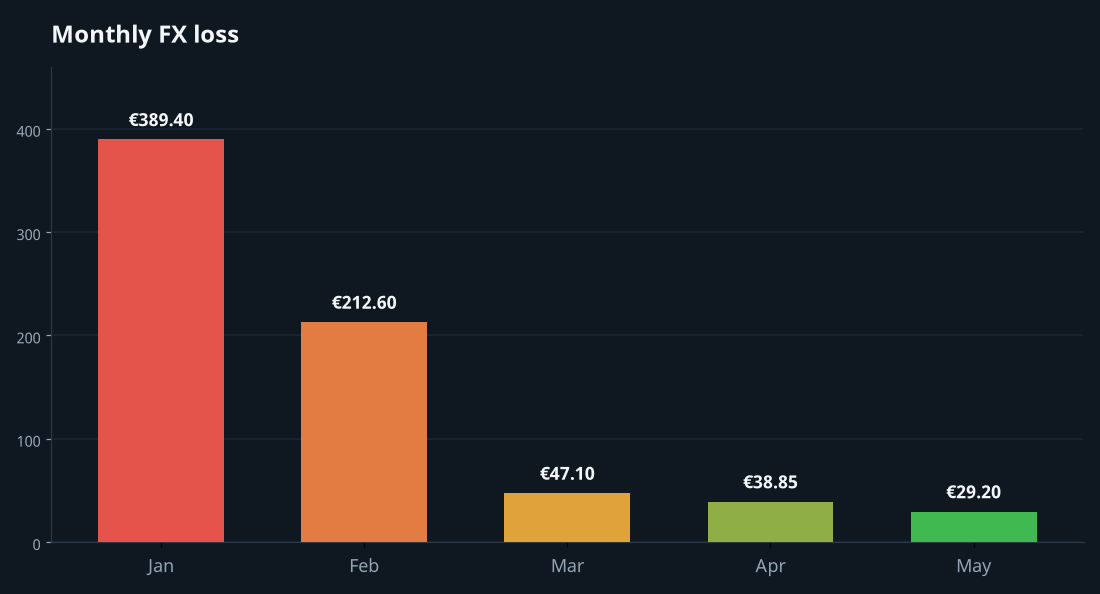
Annualized, that is roughly €4,200 back in her pocket. Or, in Mariana's framing: "a really nice trip to Japan."
What a multi-currency freelancer should actually look for in invoicing software
If you're in a similar situation — billing in two or more currencies, watching your margin disappear into FX cracks — here is the short checklist Mariana wishes she'd had two years ago:
Lock the rate at invoice send-time
A good invoicing app records the exchange rate the moment the invoice is finalized. That rate is the official number for your books. If you re-open the invoice six months later, the rate hasn't drifted to today's value.
Show the home-currency equivalent everywhere
Whether you're editing line items, looking at a dashboard, or browsing your invoice list, you should always be able to see what the invoice is worth to you. Foreign-currency totals are useful for the client; home-currency totals are useful for your sanity.
Store per-client currency defaults
You should set a client's currency once. Forever. Every invoice you create for that client should default to it.
Generate per-currency reports
At tax time, your accountant needs subtotals by currency. Software that lumps everything into one number forces you to redo the work in a spreadsheet.
The wider point
Freelancers tend to obsess over their hourly rate and ignore their tooling. Mariana raised her per-word rate by 8% last September and felt good about it. Then she lost more than that to FX in a single quarter without noticing. The hourly rate is the visible number. The invoicing workflow is the invisible one. Both compound. Both matter.
If you're sending more than a few invoices a month in more than one currency, audit your last three months the way Mariana did. Pull the quoted amount, the invoiced amount, and the amount that hit your bank. Compare them. The leak might be smaller than hers. It might be bigger. Either way, you'll know.
Try the workflow yourself
InvoiceFlow is free to download on Google Play. The multi-currency features — per-invoice rate locking, per-client currency defaults, live conversion preview, per-currency reports — are available without subscription. There is no cap on the number of currencies you can use, and the app works offline so you can finalize an invoice on a plane and it will still record the correct rate from your last sync.
Mariana, for the record, has not gone back to Google for an exchange rate in three months. She did, however, book her trip to Japan.