From Shoebox to Spreadsheet-Free: A Berlin Electrician's 6-Month Transformation
By the InvoiceFlow team — published 26 May 2026 — 11 minute read
Lukas Brandt has been wiring Altbau apartments in Berlin for nineteen years. He is, by any sensible measure, very good at his job. He is also, by his own cheerful admission, the worst bookkeeper in Friedrichshain. When we visited him in his workshop in Neukölln in March, he showed us — almost proudly — an Adidas shoebox stuffed with eight months' worth of receipts. Crumpled invoices from Bauhaus. Faded thermal-paper slips from a wholesale electrical supplier. A coffee-stained napkin with hand-written quantities on it. A train ticket folded into eighths.
"This," he said, lifting the lid, "is my finance department."
Six months later, the shoebox is empty. Not because Lukas threw it away — he keeps it as a souvenir — but because every slip inside it has been digitized, categorized, tagged to the right job, and exported into a clean PDF that his Steuerberater (tax advisor) called, without sarcasm, "the best submission you've ever made."
Here is exactly how that happened.
The pre-digital state of affairs
Before March, Lukas's expense workflow looked like this:
- Buy materials at a supplier. Stuff the receipt in a jacket pocket.
- At the end of the day, transfer the receipt from jacket pocket to the shoebox on top of the fridge.
- At the end of every quarter, panic.
- Spend an entire Sunday spreading receipts across the kitchen table, hand-keying them into a spreadsheet, swearing at faded thermal-paper rolls.
- Email the spreadsheet to his accountant.
- Get a phone call from the accountant about missing categorization. Spend another Sunday fixing it.
His estimate of time lost to this workflow was "four to six full Sundays a year." His estimate of receipts that simply got lost — fell out of pockets, faded into illegibility, blew away on a windy site — was "maybe ten to fifteen percent." For a tradesman whose materials costs are 30-40% of revenue, that lost percentage was real money — money the tax office assumed he had spent on himself.
The accountant's quiet ultimatum
His tax advisor finally said, in November, that she would no longer accept shoebox submissions. The German tax authorities had been tightening rules on digital receipt retention (GoBD requirements) and she was unwilling to be on the hook for a non-compliant client. She gave him a deadline: by April, he was either submitting digitized expenses in a proper format, or finding a new accountant.
This is the kind of deadline that focuses the mind.
The first evening with InvoiceFlow
Lukas had heard about InvoiceFlow from another tradesman at a job in Wedding. He downloaded it on a Friday night, expecting to spend the weekend in pain. What actually happened was different.
The OCR moment
The app's receipt scan feature works like this: you point your phone camera at a receipt, the app runs OCR (optical character recognition) on it, extracts the vendor, date, total amount, and tax breakdown, and pre-fills an expense entry. You confirm or correct, assign a category, and save. The original photo is attached.
"I thought it would mess up the totals," Lukas said. "On the German receipts especially — the tax breakdown is detailed, 19% MwSt, 7% MwSt, sometimes both on the same receipt. It got them right almost every time."
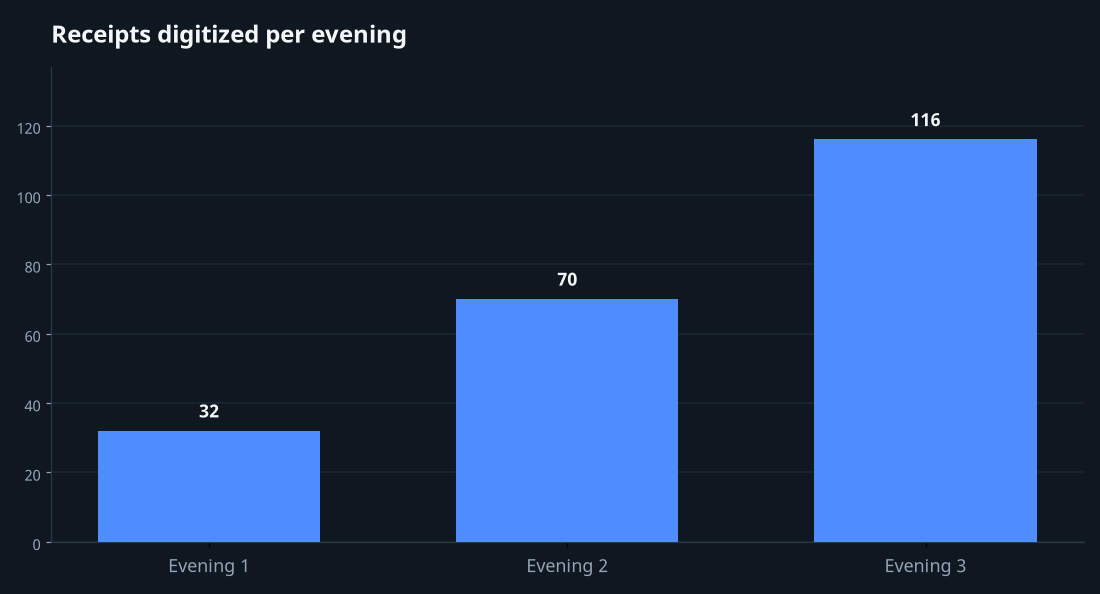
He scanned 32 receipts the first evening. Just from the top of the shoebox. He estimated each one took 25-40 seconds end-to-end, including the photo, the OCR pass, and his confirmation tap. His old spreadsheet workflow was 3-4 minutes per receipt — and that was for legible ones.
The second evening: structure
The next day he created expense categories that matched what his accountant actually needed: Materials, Tools, Vehicle, Subcontractor, Phone/internet, Training, Office supplies. He scanned another 70 receipts that evening, watching a Bundesliga match in the background.
The third evening: the rest
By Sunday night, the shoebox was empty. Approximately 218 receipts had become 218 expense records, each with its photo attached, each properly categorized, each tied to either a specific client job or to general overhead.
What changed in his business afterward
The big surprise wasn't tax compliance. That was the original goal and it was achieved. The surprise was what Lukas could see about his own business once the data existed.
Per-job profitability
Because each expense could be tagged to a specific client or invoice, Lukas suddenly had per-job profit numbers. He discovered that the work he liked the least — high-end residential renovations for design clients in Mitte — was also his most profitable per hour, while the work he liked the most — quick reactive jobs for old apartments in Kreuzberg — was barely break-even after materials. He didn't stop doing the Kreuzberg work, because he loves it, but he raised his minimum call-out rate by €30 and stopped feeling guilty about it.
Material cost trends
By looking at six months of categorized expenses, he could see that one of his regular suppliers had quietly raised prices on copper cable by almost 12% across the period. He hadn't noticed because each individual purchase looked normal. The aggregate told a different story. He switched 60% of his copper purchases to a wholesaler in Spandau and saved roughly €180 a month.
Vehicle expense clarity
Fuel, parking, occasional repairs, and toll receipts now lived in a single Vehicle category. At year-end, he could pull the total in two taps and hand it to his accountant. No more "wait, did I include the parking on the Charlottenburg job?" conversations.
The receipt-scan workflow, step by step
If you're considering this for your own business, here is how the process actually works on a phone:
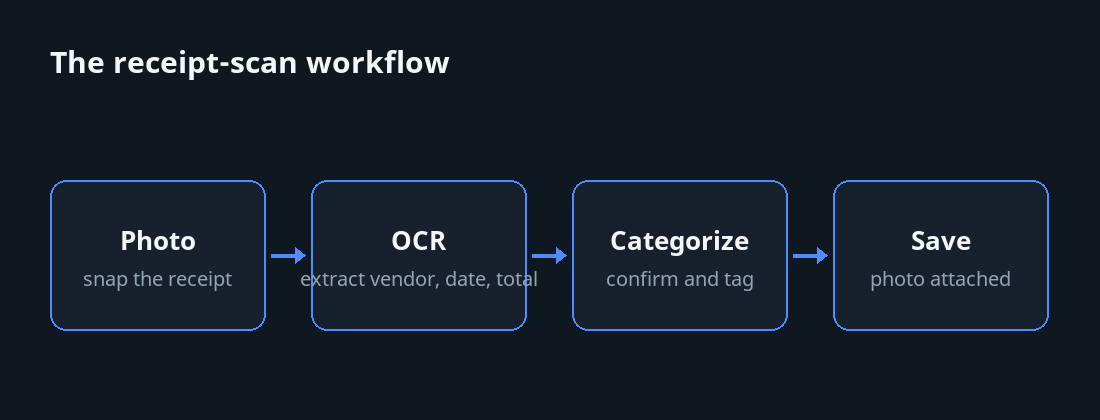
Step 1: Open the app, tap the expense floating button
The expense entry sheet appears with a camera icon. Tap it. Take a photo of the receipt against a contrasting surface (a dark countertop works well for white receipts; a piece of white paper works for dark ones).
Step 2: Let OCR run
This takes 2-4 seconds on a modern phone. The app extracts the vendor name, the date, the total, and tries to identify the tax breakdown. Faded thermal receipts work less well than fresh ones; receipts with multiple tax brackets work better than you'd expect.
Step 3: Confirm or correct
Look at the pre-filled fields. Fix anything wrong (usually nothing). Add a category. Add a job/client if applicable.
Step 4: Save
The expense is stored with the photo attached. Both are searchable later. The photo satisfies German digital-retention rules; you can technically throw away the paper, though most tradesmen keep it for a year just in case.
What about really difficult receipts?
Three categories give OCR a hard time:
- Faded thermal paper. If a receipt has been in a hot car for a month, OCR will struggle. Lukas's solution: scan receipts at end-of-day, not end-of-quarter.
- Hand-written invoices. Some small suppliers still hand-write. OCR can't read handwriting reliably. You enter these manually but still attach the photo.
- Multi-page invoices. Wholesale orders sometimes run to three or four pages. The app lets you attach multiple photos to one expense; you enter the total manually but all pages are retained.
Tax-time, six months later
When April came around and the deadline hit, Lukas exported his expenses as a single categorized PDF, sorted by date, with all receipt photos embedded. He sent it to his accountant by email at 9pm on a Thursday. She replied at 7am on Friday with the sentence we quoted at the top of this article.
"Best submission you've ever made."
Then she sent him a higher invoice than usual because, she explained, "now that everything is organized, I can actually optimize your situation properly." His refund came back roughly €1,400 higher than the previous year, even after her increased fee, because she was able to claim deductions that had previously been lost in the shoebox.
The mindset shift
The thing Lukas keeps emphasizing when we talk to him isn't the time savings or the tax refund. It's that he stopped dreading a quiet part of his business. Bookkeeping went from being the thing that ruined his Sundays to being a 90-second habit at end-of-day. He scans the receipts in his van before driving home. By the time he walks in the door, his books are up to date.
"I am not a finance person," he told us. "I will never be a finance person. But I no longer have to pretend to be one once a quarter."
What to look for in a receipt-scanning tool
If you're evaluating apps for this purpose, the features that actually matter for tradespeople and small-business owners:
On-device OCR
Receipts contain sensitive information (vendor relationships, purchase prices, your spending patterns). On-device OCR — where the recognition happens on your phone rather than being uploaded to a cloud service — is faster, works offline, and doesn't share your data.
Multi-tax-rate detection
European receipts often contain multiple VAT rates on one slip. Your software should detect and store these separately.
Category and client tagging
Per-job profitability only works if expenses can be linked to specific clients or invoices. This is the difference between bookkeeping that satisfies tax authorities and bookkeeping that helps you run your business.
Export to accountant-friendly formats
PDF with embedded photos, CSV with structured columns, or DATEV format if you're in Germany. Your accountant should be able to import without re-keying.
Offline operation
You're going to be on construction sites with bad signal. The app needs to work without internet and sync when you get home.
The shoebox, repurposed
Lukas has kept the empty shoebox on top of his fridge. He uses it now for keys. Asked what he would tell other tradesmen still in his old situation, he didn't hesitate: "Don't wait for an accountant ultimatum. The shoebox isn't a bookkeeping system. It's a way of telling yourself you'll deal with it later. Later costs you €1,400 a year. Probably more."