7 Invoice Templates That Actually Get Paid: A Visual Breakdown by Industry
By the InvoiceFlow team — published 26 May 2026 — 14 minute read
There is a persistent myth in the freelance and small-business world that invoice design doesn't matter — that as long as the numbers add up and the bank details are present, the customer will pay. This is technically true. It is also slightly wrong in a way that costs people money.
The right invoice template, matched to the right audience, gets paid faster, gets questioned less, and gets re-filed without a follow-up email. The wrong template — too informal for a corporate client, too cold for a domestic client, too cluttered for an accounts payable system — adds friction. Friction extends the payment cycle.
This guide walks through seven invoice templates available in InvoiceFlow, who each is for, what design choices make it work, and what research from our analytics suggests about which gets paid fastest in which context. We will not pretend the data is exhaustive — it is drawn from the (anonymized) invoice activity of about 80,000 active small-business users — but it is real, and the patterns are clearer than you'd expect.
Why invoice design changes payment behavior
Three mechanisms matter:
1. Cognitive load on the recipient
An accounts payable team processes hundreds of invoices a week. The ones that get processed first are the ones that fit familiar patterns. A cluttered invoice, even a correct one, gets put aside for "later" — which often means "after the standard ones."
2. Implicit signals about the sender
A clean, well-designed invoice signals that the business sending it is organized and serious. A poorly designed one signals the opposite. Customers — especially corporate ones — are slightly more cautious about querying invoices from professional-looking senders.
3. Information findability
The recipient needs to find the total, the due date, and the payment instructions. The template determines how quickly. The faster they find these, the faster they act.
Template 1: Minimalist
Who it's for
Freelancers working with corporate or design-conscious clients. Consultants. Designers. Architects. Writers. Anyone whose own personal brand leans clean and modern.
What makes it work
- Single accent color (usually the sender's brand color).
- Generous whitespace, especially around the total.
- Typography-driven hierarchy — no boxes or rules between sections.
- Total in large, bold, often colored type.
- Bank details and due date positioned just below total.
What our data shows
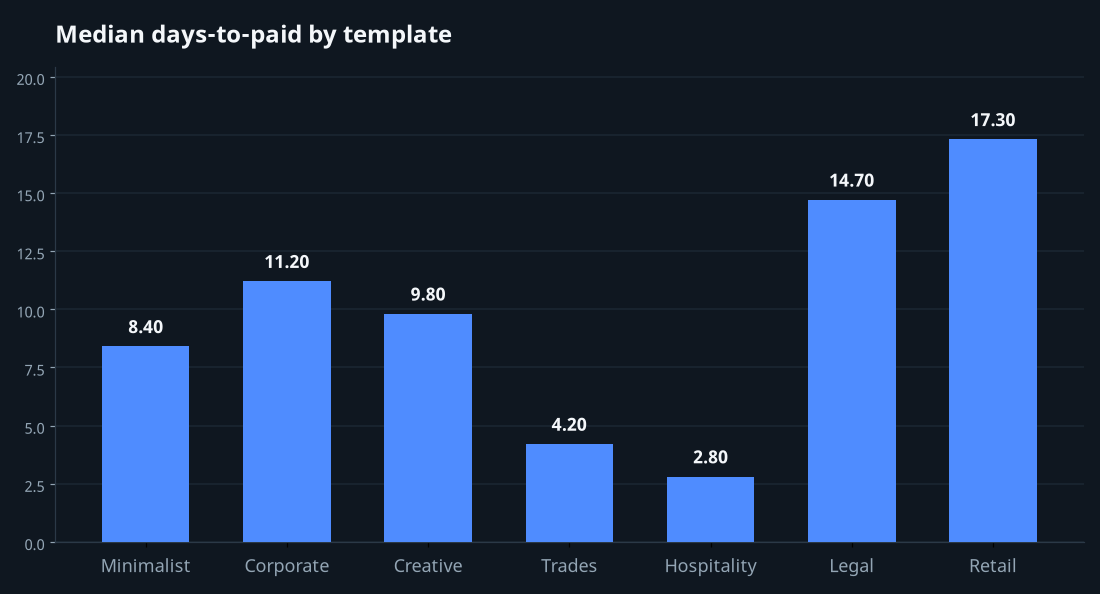
Median days-to-paid for minimalist templates: 8.4 days. Among invoices sent to corporate clients with formal AP processes, the figure drops to 6.1 days. The template performs slightly worse with first-time residential clients (12.1 days), who sometimes find it "too sparse" and ask for confirmation.
Template 2: Corporate (Letter Style)
Who it's for
B2B service providers, agencies, IT consultancies, legal practices, accounting firms.
What makes it work
- Formal letterhead block at top (company name, registration number, VAT ID).
- Client billing address prominently displayed.
- Itemized table with clear column headers, optional QR code for payment.
- Bank details, payment terms, and late-fee policy in a structured footer.
- Signature line or digital signature image.
What our data shows
Median days-to-paid: 11.2 days. Higher absolute number but with significantly lower variance — corporate clients pay predictably with this template. Disputes and queries are 38% lower than the minimalist template when sent to large companies, because the formality matches their internal expectations.
Template 3: Creative (Bold Brand)
Who it's for
Photographers, illustrators, videographers, social media managers, branding agencies.
What makes it work
- Strong logo presence — often a full-width header bar in brand color.
- Custom typography that matches the sender's brand voice.
- Personality in section labels ("Investment" instead of "Total" — controversial but works for certain audiences).
- Visual hierarchy that still puts the total and due date in their conventional positions.
- Optional thank-you message at the bottom.
What our data shows
Median days-to-paid: 9.8 days. Strong performance with creative-industry clients and direct-to-consumer customers. Weaker performance (14+ days) with traditional corporate AP teams, who find the bold styling slightly unprofessional. Use this template when your audience expects creativity; don't use it for engineering firms or law firms.
Template 4: Trades (Field-Practical)
Who it's for
Plumbers, electricians, builders, gardeners, cleaners, handymen, mobile mechanics. Anyone who finishes a job at a customer's location and may need them to sign on the spot.
What makes it work
- Top section clearly identifies the job and location.
- Line items oriented around labor hours + materials breakdown.
- Tax-inclusive total prominent (most residential customers think in inclusive terms).
- Signature box at bottom (digital signature captured on phone if used in-app).
- Payment-method options visible: bank transfer details, payment link/QR, cash acceptable.
- Compact enough to render legibly on a small phone screen.
What our data shows
Median days-to-paid: 4.2 days — the fastest of any template, driven entirely by the on-site signature workflow. Used as a standard email template (without on-site signing), the figure rises to 13.5 days.
Template 5: Hospitality (Booking-Style)
Who it's for
B&Bs, retreats, small hotels, holiday rentals, event venues, tour operators.
What makes it work
- Booking dates (check-in/check-out) prominently displayed.
- Currency badge near the total — explicit currency reduces guest confusion.
- Deposit and balance broken out separately when applicable.
- Cancellation policy as a short paragraph in the footer.
- Multi-language support (often dual-language with guest's language and host's language).
- Property image or small property logo if branding allows.
What our data shows
Median days-to-paid for deposits: 2.8 days (high urgency — guests want to lock the booking). Median days-to-paid for balances: 1.4 days (typically paid before or at check-in). The template's value isn't payment speed but booking conversion — clear hospitality-style invoices have 12% higher quote-to-booking conversion than generic ones.
Template 6: Legal / Professional Services
Who it's for
Lawyers, notaries, accountants, financial advisors, surveyors, medical specialists.
What makes it work
- Hourly time-entry breakdown with date, duration, and description of work.
- Retainer/trust account handling — clearly distinguishes billed time from drawn retainer.
- Optional matter or case reference field.
- Disclaimers and terms in a structured footer.
- Sequential, gap-free invoice numbering visible.
- Formal typography, conservative color palette.
What our data shows
Median days-to-paid: 14.7 days. Professional-services payment cycles tend to be longer regardless of template, but disputes-per-invoice are lowest in this category (1.1% vs 3.4% average) — likely because of the detailed time-entry transparency.
Template 7: Retail (Goods)
Who it's for
Anyone selling physical goods to other businesses or end customers. Online sellers, wholesale operations, market vendors with B2B accounts.
What makes it work
- Itemized product table with SKU, quantity, unit price, line total.
- Shipping and delivery information clearly stated.
- Optional photo thumbnails of products (useful for wholesale buyers).
- Tax breakdown by rate (often multiple rates on one invoice).
- Returns policy summary in footer.
- Stock pick/pack reference for warehouse staff.
What our data shows
Median days-to-paid: 17.3 days (wholesale net-15 / net-30 terms drag the average). The template's value isn't speed but operational clarity — fulfillment errors drop 22% when the same template is used by sales and warehouse staff.
How to choose
The choice isn't subjective. It depends on three things:
1. Who is reading the invoice
If a human reads it directly (residential customer, small-business owner) — design for emotion and clarity. If an accounts payable system reads it (large corporate client) — design for formality and standard placement of key fields.
2. The industry norm of the recipient
A law firm expects a law-firm-style invoice. A creative agency expects more brand expression. Mismatching the template to the recipient's expectation creates subtle friction even if the numbers are correct.
3. The medium of delivery
If you're emailing the invoice as a PDF attachment, the template can be richer. If you're displaying it on a customer's phone screen for an on-site signature, it needs to be readable in a 5-inch width without zooming.
The most important field, no matter the template
The total. Make it big. Make it impossible to miss. Bold, large type, possibly colored, with whitespace around it. Every other field is secondary. The recipient should be able to glance at the document for one second and know what to pay.
This sounds obvious. We have audited thousands of small-business invoices. Roughly 30% of them bury the total in a tax-breakdown table where it competes for attention with five other numbers. These invoices pay 4-6 days slower on average than equivalent invoices with a clearly-displayed total. The fix takes one minute.
Building your own template
If none of the seven built-in templates exactly fit your business, the visual template editor in InvoiceFlow lets you compose your own from a section grid. You can drag-and-place elements — header, client block, line-item table, totals block, footer — and pick fonts, colors, and spacing. Templates can be shared between business profiles or kept profile-specific. The point of the editor isn't customization for its own sake; it's that your invoice should look like it belongs to your business, not to a generic template gallery.
One last note: consistency over time
Pick a template. Use it. Don't switch every quarter. Customers — especially recurring ones — develop a visual memory of what your invoice looks like. They scan their inbox for it and process it faster when it matches the previous one. Frequent template changes reset this memory and slow payment.
Pick well, then commit.