Time Tracker → Invoice → Paid: A Workflow for Hourly Consultants
By the InvoiceFlow team — published 26 May 2026 — 12 minute read
Hourly consulting has a unique workflow problem. You sell your time, but you can only sell it if you can prove how you spent it. The proof has to be precise enough to be defensible at audit time, granular enough to make clients comfortable, and effortless enough to maintain throughout the week. Get any of these wrong and you either undercharge (because you didn't track everything), get challenged on your invoices (because the detail is vague), or burn out on bookkeeping (because the tracking takes longer than the work).
This article walks through a complete time-to-invoice-to-paid workflow for hourly consultants. It assumes a single practitioner or a very small consultancy; the principles scale to teams but the specifics simplify a lot when it's just you.
The three failure modes of hourly consulting
Failure 1: Under-tracking
You forget to start the timer. You forget to stop it. You batch entire half-days as "client work" with no breakdown. At month-end, you guess at the time distribution. Best case: you undercharge consistently. Worst case: you can't defend your invoice when a client asks for detail.
Failure 2: Over-tracking
You log every 5-minute interruption with such granular precision that the act of tracking takes 30 minutes a day. The detail is impressive on the invoice and unsustainable in practice. You'll abandon it within six weeks.
Failure 3: Late-tracking
You don't track during the work. You reconstruct it on Friday afternoon from memory, calendar entries, and email timestamps. The reconstruction takes hours, the numbers are slightly off, and your invoice for the week is delayed.
The right workflow avoids all three.
The workflow, end to end
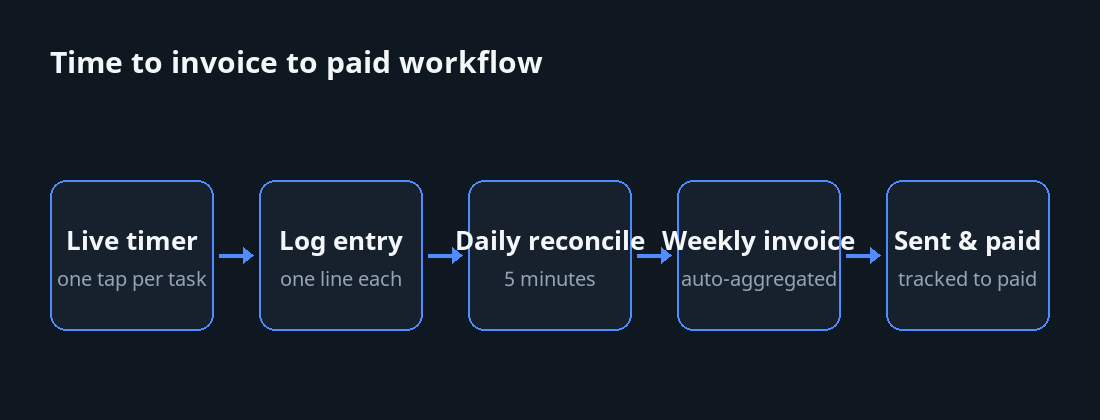
Step 1: Live timer for active work
Start a timer when you start working on a client task. The timer should be one tap from any screen of your phone or computer. It should clearly show what client and what project the timer is associated with — visible at a glance — so you don't accidentally bill the wrong client when you finish.
The single most important property of a usable timer is friction. If starting one takes more than two seconds, you'll forget. If stopping one takes more than one second, you'll let it run too long.
Step 2: One-line description per session
When you stop the timer, write one line describing what you did. Not a paragraph. One line. Examples: "Reviewed Q2 forecast and drafted board memo." "Pair-programmed authentication module with engineering lead." "Strategy call: discussed expansion to Brazil market."
This is enough to be defensible on an invoice and small enough to maintain. Don't write more. Don't write less.
Step 3: Daily reconcile (5 minutes max)
At end-of-day, glance at your time entries for the day. Add anything you missed. Fix any timers you forgot to stop. Move anything tagged to the wrong client. This takes five minutes and prevents the catastrophic Friday afternoon reconstruction.
Step 4: Weekly invoice generation
At end-of-week (or end-of-month, depending on your billing cadence), generate the invoice from accumulated time entries. The right tool aggregates entries by client and project, lets you preview the invoice as a draft, and lets you tidy descriptions or combine related entries before sending.
You should not be retyping anything from your time log into your invoice. The tool should do this.
Step 5: Send with specific payment terms
The invoice goes out with specific due date, late-fee policy, and one-tap payment options (see earlier articles on payment terms and faster payment for the why).
Step 6: Track to paid
The invoice's status moves from "sent" to "paid" automatically when payment lands, either via integration with your payment processor or by manual mark-when-deposit-clears. Days-to-paid for each invoice is tracked. The dashboard tells you which clients are slow and which are fast.
The granularity question
How granular should your time entries be?
The right granularity depends on your hourly rate and client expectations. Heuristics:
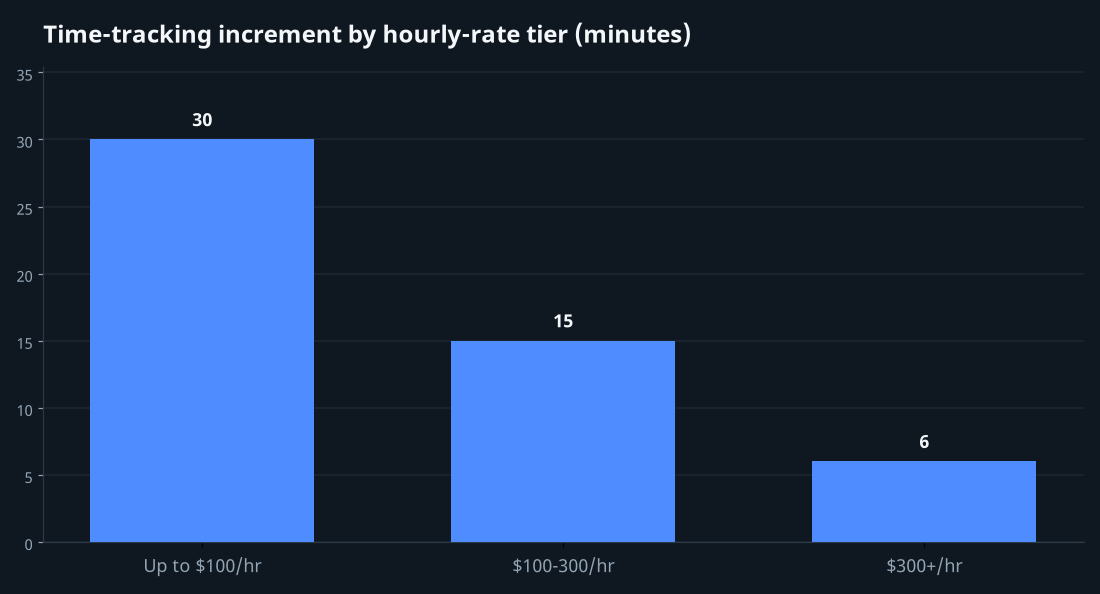
- Up to $100/hour: 30-minute increments are usually fine. Round to the nearest 30 minutes when stopping the timer.
- $100-300/hour: 15-minute increments. Clients will scrutinize this rate range more, so the detail matters.
- $300+/hour: 6-minute increments (1/10th hour). This is the legal industry standard for a reason; clients at these rates expect granular accounting.
Going finer than your tier doesn't impress clients — it makes you look like you're nickel-and-diming. Going coarser invites questions.
How to round
Round to your increment. Don't bill 12 minutes; round to 15. Don't bill 47 minutes; round to 60 if your tier is hourly, or to 45 if you're billing in 15-minute increments. Be consistent. Round up consistently or round to nearest consistently — pick one and stick with it.
The project / phase / task hierarchy
For complex engagements, you'll want to track time at three levels:
- Client: who is paying.
- Project: what engagement (a specific contract or scope).
- Task or phase: what kind of work within the project (research, strategy, implementation, review).
The right tool lets you tag time entries with all three. At invoice time, you can summarize by project, group by phase, or list every entry — whichever the client expects.
Non-billable time tracking
Track non-billable time too. Business development, internal admin, training, marketing — all of these are work. You won't invoice them, but you should know what they cost you in time.
Knowing your billable percentage (typically 50-70% for a healthy consulting practice) helps you price correctly. If you bill at $200/hour but only 50% of your hours are billable, your effective rate is $100/hour. Adjust accordingly.
The estimate-vs-actual feedback loop
When you scope new work, estimate how long it'll take. When you finish, compare estimate to actual. Over time, you'll calibrate. Most consultants under-estimate by 30-50% in their first year and over-estimate by 10-15% in their fifth.
The right tool lets you log estimates at project-creation time and compare them to actuals at completion. This data is internal — you don't show clients — but it transforms your future scoping.
Common pitfalls
Pitfall 1: Tracking too many categories
If you have 25 tags and 18 project codes, you'll spend more time categorizing than working. Three to five tags, one project per engagement, simple client structure. Resist the urge to over-systematize.
Pitfall 2: Reconstructing weeks later
The reconstructed week is always inaccurate and always undercounts. Track live. If you fall behind, get caught up the same day.
Pitfall 3: Showing clients your raw time log
Your time entries are notes-to-self. The client invoice is a polished output. Don't paste your "checked email re: nothing, made coffee, dealt with crisis in unrelated project" into the invoice. Clean descriptions only.
Pitfall 4: Letting the timer run while you eat lunch
This is the most common over-tracking error. Pause the timer when you stop working. Stop the timer at end of day even if you didn't finish. A timer that runs accidentally for 9 hours destroys the trust your detailed log was supposed to build.
What good looks like
A consultant with a working time-to-invoice workflow has these characteristics:
- Tracks 95%+ of billable time without thinking about it.
- Generates invoices weekly or biweekly with under 15 minutes of work.
- Has defensible per-entry descriptions ready if asked.
- Knows their billable percentage and adjusts pricing accordingly.
- Estimates project length within ±20% of actual.
- Gets paid in 7-14 days median.
A consultant without a working workflow has these:
- Loses track of 10-20% of billable time.
- Spends most of Friday afternoon doing time reconstruction.
- Has fuzzy entries that invite client questions.
- Has no idea what their billable percentage is.
- Under- or over-estimates new projects by 50%+.
- Gets paid in 20-30 days median, with occasional follow-ups.
The difference between the two is not talent or work ethic. It's whether you have a workflow.
Setting it up in InvoiceFlow
The time-tracker feature integrates with the invoice editor: time entries are captured against a client and (optionally) a project, and at invoice creation time they're aggregated automatically into line items. You can pick a single time entry, a range, or an entire month's worth, and they'll appear in the invoice with their descriptions and durations. Hourly rates are stored per-client (or per-project, for engagements with mixed rates), so the math is automatic.
Daily reconcile takes about three minutes if you've been tracking live. Weekly invoice generation takes five to ten depending on how much you want to tidy descriptions.
The compounding habit
The time-tracker-to-invoice workflow isn't a productivity hack. It's a discipline. Once it's habit — start the timer, write the one-liner, glance at the daily summary — it disappears into the background. The result is invoices that go out on time, that don't get questioned, and that get paid quickly. The work itself doesn't change. The friction around the work disappears.
That, at the end of the day, is what good operational tooling is for.