Backup, Restore, Switch Phones: A Paranoid Freelancer's Guide to Invoicing Data
By the InvoiceFlow team — published 26 May 2026 — 12 minute read
Your invoicing data is, in a very real sense, your business. The clients you've billed, the prices you've quoted, the products you've sold, the templates you've designed, the tax records you've accumulated — all of it lives in your invoicing software. Lose it and you don't just lose data. You lose your audit trail. You lose your client history. You lose your numbering sequences (which can create compliance problems). You lose the ability to reproduce documents that customers or tax authorities may request years later.
Most freelancers think about backup the way they think about flossing: they know they should, they don't actually, and they only discover the consequences at exactly the wrong moment.
This article is the paranoid freelancer's complete guide to backup, restore, and migration of invoicing data. It's practical, somewhat opinionated, and ends with a checklist you can run today.
The scenarios you should be ready for
Be specific about what you're protecting against. The scenarios are:
1. Phone loss or theft
The most common scenario. You leave your phone in a taxi. Your bag gets stolen at a café. The phone falls in a swimming pool. Whatever the cause, the device is gone and you need to restore your business onto a new one within hours, not weeks.
2. Phone failure
Phones die. Batteries swell. Screens shatter. Operating system updates brick devices. Even well-maintained phones eventually fail. If you've used the same phone for invoicing for three years, statistically it's about to fail.
3. Account compromise
Your cloud account gets hacked. Your data is exfiltrated or, worse, deleted. You need a backup that exists outside the compromised account.
4. Accidental deletion
You meant to delete one invoice and deleted ten. You meant to clean up old clients and removed an active one. You meant to merge two duplicate clients and accidentally merged the wrong direction. Recoverable mistakes shouldn't be permanent.
5. Tax audit / legal request
Tax authorities, lawyers in a contract dispute, or regulators may request invoices from 5+ years ago. Your backup needs to span the entire required retention period for your jurisdiction (typically 5-10 years).
6. Voluntary migration
You decide to switch software vendors. Or you switch from a personal phone to a business one. Or you decide to add a tablet to your workflow. Your data needs to move with you.
The three-layer backup strategy
Real protection requires three layers. Any one alone has failure modes.
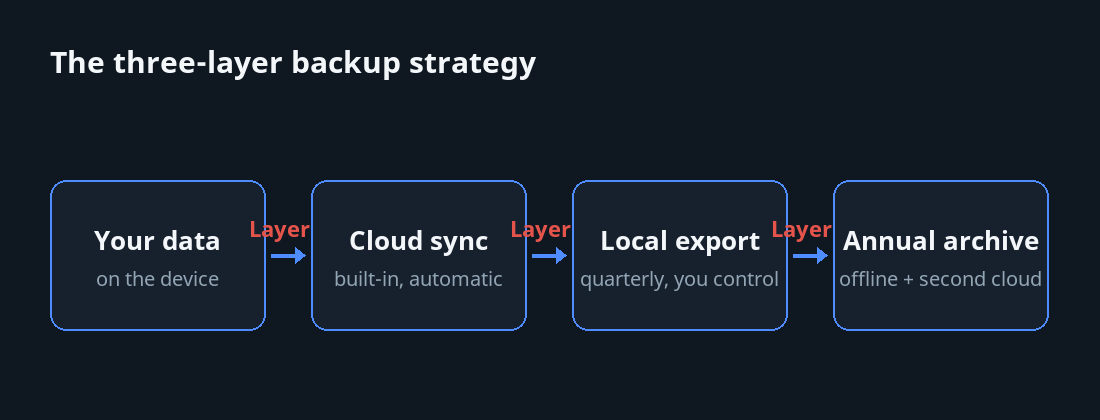
Layer 1: Built-in cloud sync
Most modern invoicing apps offer cloud sync to your provider's servers. This is the default backup most freelancers rely on. It's good — your data is in two places (your device and the provider's cloud) — but it has limits:
- If your account is compromised, this backup is compromised too.
- If the provider goes out of business, this backup goes with them.
- If the sync logic has a bug and corrupts data, both copies become corrupted.
Cloud sync is necessary. It is not sufficient.
Layer 2: Periodic local export
The second layer is regular exports of your data to a format you control. Every quarter (or every month, if you're paranoid), export:
- All invoices as PDFs, plus a CSV of invoice metadata.
- All clients as a CSV.
- All products as a CSV.
- Your templates and logos as image/template files.
- Your business profile settings as a JSON or screenshot.
Save these to two separate destinations — for example, one to Google Drive and one to a USB stick or a backup hard drive at home. Two destinations protects against a single cloud account being compromised.
Layer 3: Annual archive
Once a year, create a complete archive of your invoicing data: all invoices, all PDFs, all attachments, all settings. Compress it. Store one copy offline (on a USB drive locked in a drawer, for instance) and one copy on a different cloud provider than your primary.
This is the layer that protects against year-spanning disasters — your primary cloud provider going bankrupt, your account being permanently locked, ransomware on your local devices.
The restore drill
Backups you've never tested aren't backups. They're hopeful storage. Once a year, do a restore drill:
- Install your invoicing app on a different device (or a wiped second phone).
- Sign into your account.
- Wait for the data to sync.
- Verify that recent invoices, clients, and products are present and correct.
- Open a few invoices to confirm PDFs regenerate properly.
- Check that your templates, logos, and settings restored.
If anything is missing or wrong, fix the issue now — when you have time — not later, when you've just lost your primary device.
Phone migration: the smooth path
Switching to a new phone is the highest-friction backup scenario. Here's how to do it without losing data:
Before getting the new phone
- Confirm your current phone has synced recently (open the app, check the sync status indicator).
- Run a manual local export as a belt-and-braces precaution.
- Note your invoicing account credentials.
On the new phone
- Install the invoicing app.
- Sign in with the same account.
- Wait for the initial sync. This can take a few minutes for large datasets.
- Verify everything is present (do the restore drill above).
Before retiring the old phone
- Keep the old phone running for at least 7-14 days after migrating, with sync still enabled, in case anything is missing.
- Once you're confident, sign out of the invoicing app on the old phone and wipe the device.
Multi-device usage
Using the app on both a phone and a tablet is generally fine, with a few caveats:
- Make sure both devices are signed into the same account.
- Sync should be automatic when each device comes online.
- If you make conflicting changes on both devices while one is offline, the app should resolve the conflict (last-write-wins for most invoicing data; conflict logs for edits to the same record).
- Don't run two devices in heavy offline mode simultaneously — it's not a disaster, but it increases the chance of conflict resolution biting you.
Cloud vendor lock-in: how to evaluate
Some invoicing apps make export easy. Some make it nearly impossible. Before you commit to a vendor, test their export:
- Can you export all your invoices as PDFs, in bulk, in one operation?
- Can you export client and product data as CSV or another open format?
- Can you export templates and design choices in a way that's portable, or are they vendor-locked?
- If you stop paying for the app, can you still access your historical data, even read-only?
Vendors that fail any of these are exit-trap vendors. Avoid them if you can; if you can't, your local export discipline becomes critical.
The legal retention question
Different jurisdictions have different invoice retention requirements:
- United States: 3 years federal, longer in some states.
- United Kingdom: 6 years.
- Germany: 10 years.
- France: 10 years.
- Most EU countries: 5-10 years.
- Brazil, Mexico: 5+ years with specific format requirements.
- India: 8 years.
Your backup strategy needs to cover the longest applicable period. If you're VAT-registered in the EU, plan for 10 years.
The encryption question
Your invoicing data contains sensitive information: client names, addresses, your pricing, your tax numbers, sometimes your customers' payment details. Backups should be encrypted:
- Cloud backups should use the provider's encryption at rest, ideally end-to-end if available.
- Local exports stored on cloud drives should be in encrypted form (zip with password, or a tool like 7-Zip with AES-256).
- USB drives with backups should use full-disk encryption (BitLocker on Windows, FileVault on Mac, dm-crypt on Linux).
Encryption isn't paranoia. It's the responsible default for any business data.
The paranoid checklist
If you do nothing else from this article, do this:
- Right now: open your invoicing app and check that cloud sync is enabled. Confirm the last sync was recent.
- This week: do a manual export of all your data. Save it to a folder. Then copy that folder to a USB drive.
- This month: do a restore drill. Install the app on a friend's phone or a tablet you don't usually use; sign in; verify everything restored.
- Set a recurring calendar reminder: "Quarterly invoice data export." Do it.
- Set another recurring calendar reminder: "Annual archive + restore drill." Do that one too.
If you can't do all five today, do step 1 right now. The others can wait a week. But not longer.
The mindset
Backups are not a project. They're a discipline. The freelancer who only sets up backup after their first data-loss event has already taken a permanent hit. The freelancer who sets it up proactively never has the experience and doesn't realize how lucky they are.
Be the second kind.