Quote-to-Invoice Conversion: The 60-Second Workflow Most Freelancers Don't Use
By the InvoiceFlow team — published 26 May 2026 — 8 minute read
Most freelancers write a quote, the customer accepts, the work happens, and then the freelancer creates a new invoice from scratch — re-typing the client details, re-listing the line items, re-calculating totals. This is wasted effort. The quote already contains everything the invoice needs. The conversion should be one button.
This article covers the proper quote-to-invoice workflow, why most freelancers don't use it, and how to set it up in 10 minutes.
The lifecycle that should be automated
For most project work, the document flow is:
- Quote sent (status: sent).
- Customer accepts (status: accepted).
- Optional deposit invoice generated from quote (status of quote: deposit invoiced).
- Work proceeds.
- Final invoice generated from quote on completion (status: fully invoiced).
- Customer pays (status: paid).
Most invoicing tools support this end-to-end, but most freelancers don't know to use it. They treat quotes and invoices as separate documents, re-keying data at each transition. The result is duplicated work and occasional inconsistencies between what was quoted and what was invoiced.
The 60-second conversion
Properly set up, the conversion works like this:
Step 1: Mark the quote accepted
When the customer accepts your quote (signature, email reply, signed PDF), open the quote in your invoicing app and mark it accepted. This timestamps the acceptance and locks the quote (you can't accidentally edit it after).
Step 2: Generate a deposit invoice (if applicable)
If your terms include a deposit (typically 30-50%), one tap generates a deposit invoice with the appropriate amount, referencing the accepted quote. You send it. The customer pays. Status updates.
Step 3: Track work against the quote
While the work proceeds, the quote remains the source of truth for scope and pricing. Any change orders update the quote (with version tracking) so the eventual invoice reflects current scope.
Step 4: Generate the final invoice
On completion, one tap on the quote generates an invoice for the remaining balance. The line items are copied from the quote. The total is correct. The customer's billing details are populated. Deposit credit is subtracted automatically if applicable.
Step 5: Send and track
The invoice goes out using your standard email template. Days-to-paid starts ticking. Status moves to paid when the payment lands.
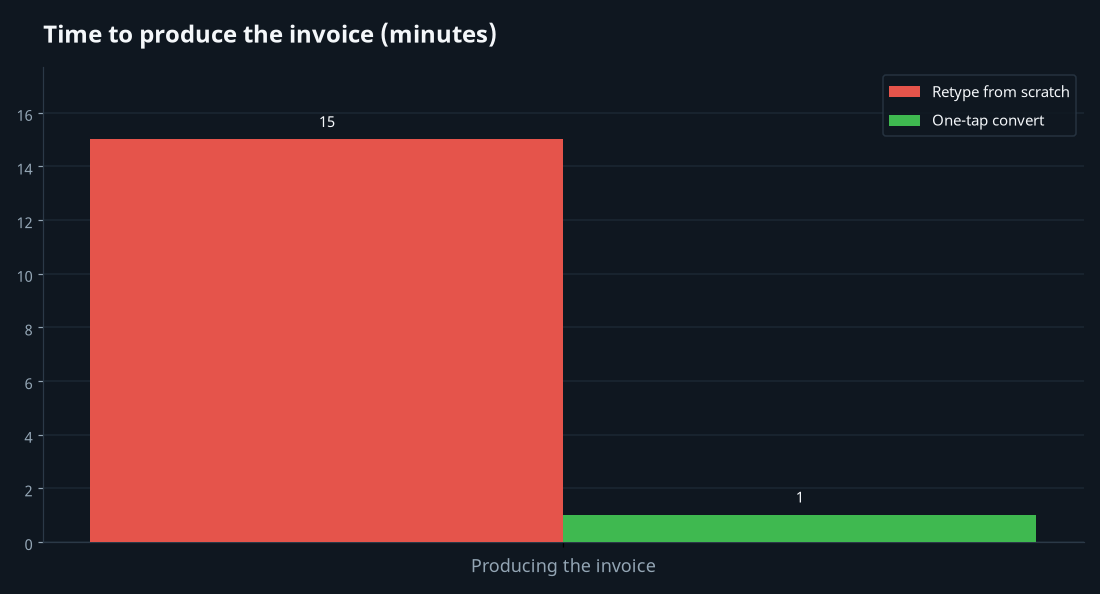
Total time: roughly 60 seconds across the project's lifecycle, versus 10-15 minutes of re-typing in the unconverted approach.
Why most freelancers don't use this
Three reasons:
1. They don't know the feature exists
"Convert quote to invoice" isn't a button most freelancers look for. They've been recreating documents from scratch for so long that they assume that's how it has to be.
2. Their tool doesn't support it well
Some invoicing apps treat quotes and invoices as completely separate entities with no linkage. In these tools, you can't convert — you have to copy by hand. This is the wrong tool.
3. They worry about numbering integrity
If quotes and invoices share a numbering sequence, conversion can confuse the sequence. The right tool uses separate sequences (QUO-2026-001 for quotes, INV-2026-001 for invoices) with explicit linkage between related documents.
Benefits beyond time savings
Consistency
Because the invoice is generated from the quote, there's no risk of pricing or scope drift between the two documents. What you quoted is what you invoice.
Audit trail
Every invoice has a verifiable trail back to the original quote, with timestamps showing when each was created and accepted. Useful for disputes, useful for tax audits.
Better metrics
Your dashboard can show quote-to-invoice conversion rates (what percentage of quotes become invoices) and quote-to-paid timelines (how long from issuing a quote to receiving final payment). These metrics are invisible if quotes and invoices aren't linked.
Cleaner client experience
The customer receives documents that reference each other clearly. "Invoice INV-2026-042 for accepted quote QUO-2026-038 dated April 12." No confusion about what's being billed for.
Handling change orders
The trickiest part of quote-to-invoice workflow is changes mid-project. Two approaches work:
Approach 1: Quote revisions with versioning
When scope changes, you issue a revised quote (QUO-2026-038-v2). The new version becomes the source of truth. The final invoice references the latest accepted version. This is cleaner but requires the customer to accept each version.
Approach 2: Separate change-order quotes
The original quote stands. Additional work is its own small quote, accepted separately. The final invoice can either combine both quotes or be split into two invoices. This is simpler but produces more documents.
Both work. Pick one and use it consistently.
What every freelancer should set up
1. Separate numbering for quotes and invoices
QUO-2026-XXX vs INV-2026-XXX. Each sequential within its type.
2. Matching templates
The quote template and invoice template should share visual identity — same typography, palette, layout structure. Documents in a series feel like documents in a series.
3. The convert-to-invoice button
If your tool doesn't have one, this is the feature to demand. Without it, you're doing too much manual work.
4. Deposit handling
Your tool should let you generate a partial-amount invoice from a quote (the deposit), then later generate the balance invoice automatically subtracting the deposit. Don't track this manually.
5. Status tracking
Quote states (draft, sent, accepted, declined, expired, invoiced) should be visible at a glance. You should see at any moment what's in your pipeline.
The 10-minute setup
If you've been doing quotes and invoices separately, here's how to switch:
- Configure separate numbering sequences for quotes and invoices.
- Build a quote template matching your invoice template visually.
- Set up deposit handling defaults (typical percentage, due date).
- Practice once on a test customer record — create a quote, convert to invoice, see the result.
- Use the workflow on the next real engagement.
Setup takes 10 minutes. The time savings compound permanently — about 8-12 minutes per engagement, multiplied across every project for the life of your business.
The wider lesson
The pre-sale documents and the billing documents are two phases of the same engagement. They should be linked operationally, not treated as parallel universes. The freelancers who treat them as one connected workflow run cleaner operations than freelancers who manually re-create each document — and they spend the recovered time on actual work.
If your current invoicing tool doesn't support quote-to-invoice conversion as a one-tap operation, that's a signal you've outgrown it.