Reading an Invoice as a Buyer: The 5 Things Procurement Actually Checks
By the InvoiceFlow team — published 26 May 2026 — 9 minute read
Most freelancers and small businesses design their invoices for themselves — to reflect their brand, to feel professional, to look like the documents they remember seeing as kids. They almost never design them for the people who actually decide when they get paid: accounts payable teams.
This article is the buyer's-side view. What an AP team actually checks when an invoice arrives. The five checkpoints. The pile each invoice gets sorted into. And how to design your invoices so they end up in the "process immediately" pile, not the "follow up next week" pile.
What happens on the receiving end
For a typical mid-sized company, the flow goes:
- Invoice arrives via email (PDF attachment) at a shared AP inbox.
- An AP clerk opens it, often as one of 40-80 invoices that day.
- The clerk runs a five-checkpoint review in 30-90 seconds.
- The invoice gets sorted: approve and queue for payment, route for internal approval, or follow up with vendor for clarification.
- The first pile gets paid on the next payment run. The second pile waits for an approver. The third pile waits for you to respond — and "next week" is optimistic.
The five checkpoints determine which pile you land in. Understanding them is the difference between net-15 actual and net-15 wished-for.
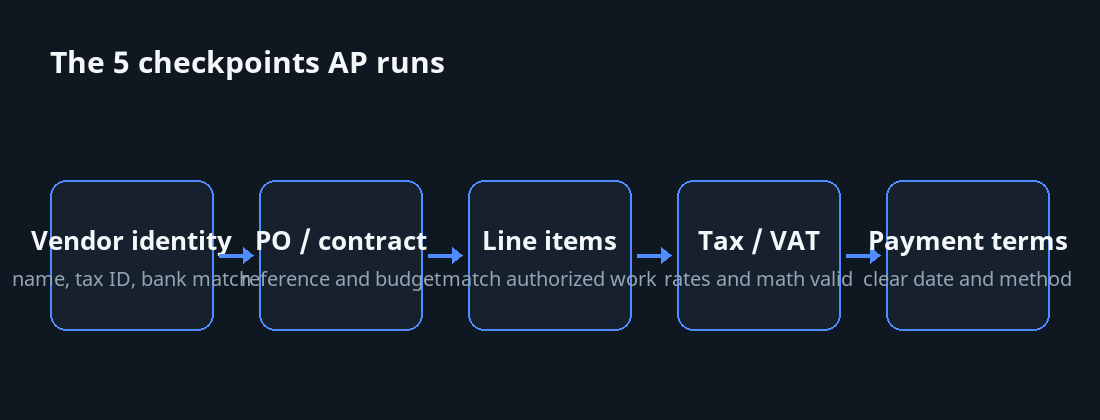
Checkpoint 1: Vendor identity match
The AP clerk's first check is whether the invoice matches an existing vendor record in their system. They look at:
- Vendor name (must match exactly what's on file).
- Tax ID or registration number.
- Address.
- Bank account details.
If any of these don't match, the invoice goes into the clarification pile. The clerk has to either find the right vendor record or ask you to update yours.
How to ace this
- Use the exact legal entity name on every invoice. "John's Design" and "Johns Design Ltd" are different to AP systems.
- Include your tax ID prominently.
- Don't change bank details casually. If you must, send a separate signed letter notifying the change, not just a new invoice with new details (which can be a fraud red flag).
Checkpoint 2: PO or contract match
Mid-sized and larger companies issue Purchase Orders (POs) or contracts that authorize specific spending. The invoice should reference the PO or contract. The AP clerk verifies:
- Does the invoice reference a PO/contract number?
- Does that PO/contract exist and have remaining budget?
- Does the invoice amount fit within the remaining authorized amount?
If there's no PO reference, or the PO is exhausted, or the amount exceeds the authorized total, the invoice gets routed for additional internal approval — which can take 1-4 weeks.
How to ace this
- Always capture the PO or contract number at engagement time.
- Reference it on every invoice in a prominent field.
- If you don't have a PO, ask for one before the work starts. Larger clients have a process; smaller ones may need a contract.
Checkpoint 3: Line-item / deliverable match
The AP clerk verifies that the work described on the invoice matches what was authorized. For PO-driven work, they compare line items to the PO's specified items. For contract work, they may need to verify with the project manager that the work was completed.
How to ace this
- Use line-item descriptions that match the PO or contract language. If the PO says "API integration phase 2," your invoice should too.
- Reference the contract or scope document explicitly.
- If you're billing for completion of a milestone, name the milestone exactly as it appears in the contract.
Checkpoint 4: Tax / VAT validity
The AP clerk verifies tax handling:
- Is the correct tax rate applied?
- Is the tax breakdown clear and arithmetically correct?
- For cross-border B2B, is reverse-charge handled correctly?
- For their jurisdiction, are required tax IDs (yours and theirs) on the invoice?
Tax errors are the most common reason invoices get bounced back. The AP clerk doesn't usually have authority to override; the invoice has to be reissued correctly.
How to ace this
- Apply correct destination-country rates for international B2C.
- Apply reverse-charge correctly for EU B2B with valid VAT IDs (we covered this in the VAT OSS guide).
- Include all required tax IDs on the invoice.
- Verify the math — subtotal, tax, total — adds up.
Checkpoint 5: Payment terms and instructions
The AP clerk checks:
- Are payment terms clear and consistent with what's agreed?
- Are payment instructions actionable (clear bank details, payment link, or method)?
- Is the due date specific?
Vague or contradictory payment instructions cause the invoice to be set aside for clarification.
How to ace this
- Specific due date, not "net 30 from receipt."
- Multiple payment options listed clearly.
- Bank details that match what's on file with the client.
The pile system, in detail
Pile A: Pay this
The invoice passed all five checkpoints. It enters the next payment cycle automatically. Some companies pay daily, some weekly, some twice a month. Either way, you're in the queue.
Pile B: Internal approval needed
The amount is over a threshold, or the PO doesn't cover it, or it's a new vendor. The invoice is routed to a manager or finance person. Expect 5-15 business days.
Pile C: Vendor needs to clarify
Something on the invoice doesn't work — wrong tax, wrong vendor info, missing reference. The clerk emails you for clarification. The clock effectively pauses until you respond, then restarts at the back of the queue. Expect 2-6 weeks total.
Designing for Pile A
The summary of everything above:
- Exact legal name match.
- Tax IDs prominently displayed.
- PO/contract reference visible.
- Line items that mirror PO/contract language.
- Tax handling correct for the specific transaction type.
- Specific payment terms with a date.
- Multiple actionable payment options.
- Bank details matching what's on file.
- Arithmetic verified.
This list looks like work. It's actually one-time setup work. Once your invoice template includes all of it, every future invoice you send qualifies for Pile A automatically.
The smaller-client variation
For sole-proprietor and small-business clients (not corporate ones), the "AP team" is the owner reading their own emails. The checkpoints are looser, but the underlying principles still apply — they're just doing the checks themselves, often in 10 seconds while triaging email. Make their 10 seconds easy.
The professional-services overlay
Some industries (law, accounting, healthcare, certain consulting categories) have additional verification expectations — detailed time entries, matter references, specific compliance language. Match the conventions of your industry. Your AP-team contacts are used to seeing invoices in a particular format from peers in your field.
The wider lesson
Most invoicing advice focuses on the sender's side: how to look professional, how to follow up politely, how to write good descriptions. All useful. But the binding constraint on payment speed is the receiver's review process, which most senders never see.
Designing your invoices for that process — by understanding the five checkpoints — moves you out of the friction layer and into the Pile A layer. Payment speed improves materially. Relationships stay smoother. The work compounds.
Read your next invoice as a buyer would. If you'd put it in Pile C, fix it before you send it.