How to Bill a Long Project by Milestone Without Floating the Whole Thing Yourself
By the InvoiceFlow team — published 16 June 2026 — 13 minute read
A three-month project paid in one invoice at the end is a loan. You front the labour, the materials, and the time, the client gets the work, and somewhere in week eleven you realize you've effectively financed their project at zero interest while your own rent came due twice. The work was good. The billing was a mistake.
The professional answer to long, large jobs is milestone billing: you break the project into phases, and you invoice each phase as it completes. The cash arrives while the costs are still accruing. The client sees steady, predictable charges tied to visible progress instead of one alarming number at the end. And if the relationship goes sideways, you've already been paid for the work you've done. This guide shows how to set that up properly in InvoiceFlow using Projects and Milestones, how to combine it with split-payment schedules and partial payments, and exactly when milestone billing beats the alternatives — with one example carried all the way through.
The job we'll use as our example
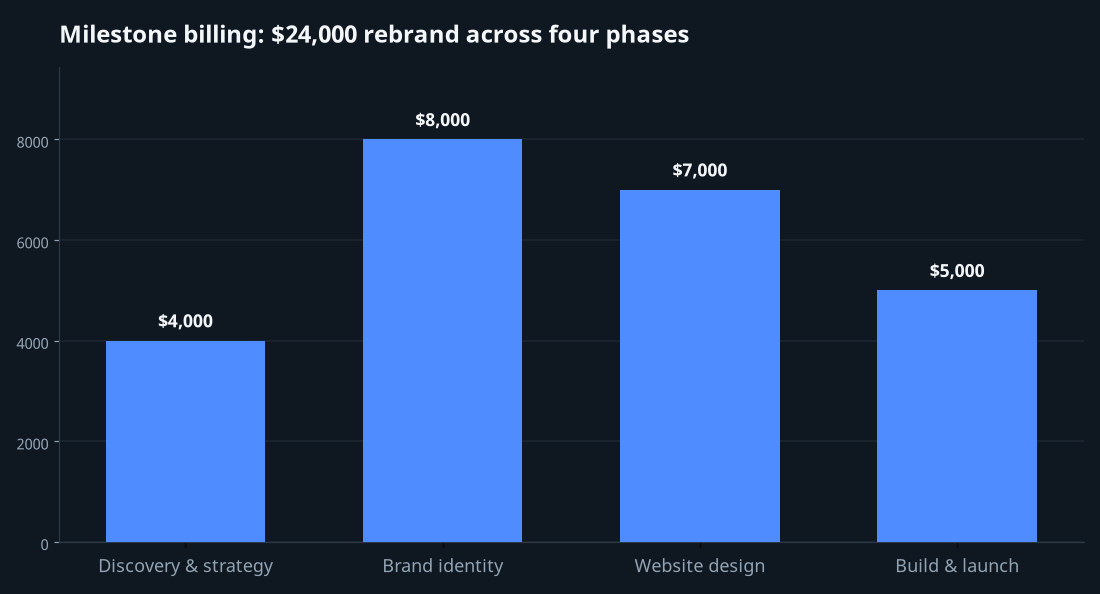
Meet Daniel, a freelance brand and web designer in Portland. He's just landed his biggest engagement yet: a full rebrand plus a new website for a mid-sized bakery chain. Total fee: $24,000. Expected duration: about three months. The work naturally splits into four phases:
- Discovery & strategy — research, positioning, moodboards. ($4,000)
- Brand identity — logo, palette, type system, brand guidelines. ($8,000)
- Website design — full site design across key templates. ($7,000)
- Build & launch — development, content load, go-live. ($5,000)
Three ways Daniel could bill this. He could send one $24,000 invoice at the end. He could send a single invoice now with a split-payment schedule. Or he could treat it as a project and bill milestone by milestone. We'll build the third — and then explain why, for a job this shape, it's the right call.
Step 1: Create the project
InvoiceFlow's Projects feature is a Notion-style client workspace — a place to group all the work for one engagement so it doesn't scatter across loose invoices. Daniel creates a project named "Bakery Co — Rebrand & Web," attaches it to the bakery's client record, and now has a single home for the whole engagement.
This matters even before any money moves. A long project generates a lot of documents over three months — an estimate, possibly a contract, then a series of invoices. Grouping them under one project means that when the client emails in week nine asking "remind me what we've paid so far," the answer is one tap away instead of a hunt through a flat invoice list. The project is the container; everything about the engagement lives inside it.
Step 2: Define the milestones
Inside the project, Daniel adds Milestones — one per phase. Each milestone represents a billable chunk of work with a clear "done" condition:
- Discovery & strategy — done when the strategy deck is delivered and approved. $4,000.
- Brand identity — done when brand guidelines are signed off. $8,000.
- Website design — done when all key page designs are approved. $7,000.
- Build & launch — done when the site is live. $5,000.
The discipline here is in the "done" conditions. Vague milestones ("about halfway") cause arguments; concrete ones ("guidelines signed off") don't. Each milestone is something the client can look at and agree is finished — which is exactly what makes invoicing it uncontroversial.
Step 3: Invoice each milestone as work completes
Here's the rhythm. Daniel doesn't invoice the whole $24,000 up front and he doesn't wait until launch. He invoices each milestone as it lands.
Week one, before any work, he takes the discovery phase as the entry point — strategy deck delivered, $4,000 invoice issued, due on receipt. The client pays. Daniel's first month's costs are already covered before he's deep into the expensive middle phases. Three weeks later the brand guidelines are signed off; he issues the $8,000 brand-identity invoice. And so on through website design and launch. By the time the site goes live and the final $5,000 invoice is sent, the client has already paid $19,000 for work they've already received and approved. Nobody is floating anybody.
Each milestone invoice is a normal, full InvoiceFlow invoice — it carries the bakery's details, the right currency, payment instructions (Daniel shows his bank details and a payment link on the PDF), and renders through whichever of the 12 templates he's chosen. Because the project groups them, the engagement's billing history reads as a clean sequence rather than four unrelated invoices.
Step 4: Track amount due across the project
Milestone billing only works if you can see where you stand. As each invoice is paid, Daniel marks it Paid in the app, and the picture stays current: $24,000 total, billed-to-date, paid-to-date, and what's still outstanding. If the client pays an invoice in two parts — say, $4,000 of the $8,000 brand-identity invoice now and the rest next week — Daniel records a partial payment and InvoiceFlow tracks the remaining balance automatically. The amount-due number is always right, which means at any moment Daniel can answer "where are we financially on this project" without a spreadsheet.
Where partial payments fit milestone work
Partial payments and milestone billing solve different problems, and they compose. Milestones break the project into billable phases. Partial payments handle the reality that any single invoice might get paid in pieces — a client whose own cash flow is lumpy, an installment they negotiate at the last minute, a deposit-then-balance on one phase. You don't have to choose. Each milestone invoice can itself be partially paid, and the project's outstanding total absorbs all of it correctly.
The alternative: a single invoice with a split-payment schedule
Milestone billing isn't the only way to spread payments. InvoiceFlow also supports split-payment schedules — you take one invoice and break it into a payment plan of scheduled installments, and the installment template renders that whole schedule on the PDF so the client sees the full plan up front.
For Daniel's bakery job he could, instead of four milestone invoices, issue a single $24,000 invoice split into a schedule: $4,000 now, $8,000 in four weeks, $7,000 in eight weeks, $5,000 at launch. One document, one number the client agrees to, a clear schedule printed on the PDF. So when do you reach for a split-payment schedule versus true milestone billing?
- Use a split-payment schedule when the total and the timeline are firm and you want the client to commit to the whole plan in a single signed document. It's clean, it's predictable, and it's ideal when payments are time-based rather than deliverable-based.
- Use milestone billing when each phase has its own "done" condition and you want each payment tied to visible, accepted progress — and when there's any chance the scope or the phase boundaries shift as you go. Milestones flex; a fixed printed schedule doesn't.
For the bakery rebrand, milestones win — because each phase has a real acceptance gate (deck approved, guidelines signed off, designs approved, site live), and brand projects almost always evolve mid-flight. But the split-schedule route is genuinely better for, say, a fixed $12,000 retainer-style engagement paid in three monthly thirds where the dates, not the deliverables, drive the billing.
Why not just one big invoice at the end?
It's worth being explicit about the option most people default to, because it's almost always the worst one for a long job. The single end-of-project invoice has exactly one virtue — it's simple to send. Against that, it stacks up every risk that milestone billing removes:
- You finance the whole project. Three months of your labour and any materials, carried on your own balance sheet until the end.
- One number, maximum sticker shock. A $24,000 invoice landing cold is far more likely to trigger a delay, a renegotiation, or a "let me run this by finance" than four invoices the client already saw coming.
- All your leverage evaporates at exactly the wrong moment. The client has the finished work; you have an unpaid invoice. If they drag the payment, your only recourse is awkward.
- Scope creep goes unpriced. With no checkpoint along the way, the extra round of revisions in month two just disappears into the final number — or into an uncomfortable conversation at the end.
Milestone billing turns each of these into a non-issue. The money arrives as the work does. Each invoice is small enough to be unremarkable. You always hold the next phase as leverage. And scope changes get caught at a milestone boundary, where they can be re-priced cleanly instead of festering.
Setting it up: the short version
Here's the whole workflow distilled, for a long project of your own:
- Create a Project for the engagement and attach it to the client. This is your single workspace for everything that follows.
- Break the work into milestones — one per billable phase, each with a concrete "done" condition and a price. Keep the conditions things the client can look at and agree are finished.
- Optionally send an estimate first covering the full scope and the milestone breakdown, so the client approves the plan before you start. Estimates convert to invoices in InvoiceFlow, including partial conversion — handy if you want to bill only the first phase from an approved quote.
- Invoice each milestone as it completes. Full invoice, payment instructions on the PDF, due on receipt or short terms.
- Record payments — including partial ones — as they come in, and let the project's amount-due figure keep your running total honest.
If instead your job is time-driven rather than deliverable-driven, swap step 4 for a single invoice with a split-payment schedule. Same goal — money arriving as the project runs — different mechanism for a different shape of job.
The wider point
Long projects fail financially in a predictable way: the work goes fine, the billing comes last, and the freelancer absorbs three months of risk for free. Milestone billing inverts that. By treating the engagement as a Project, breaking it into Milestones with real acceptance gates, and invoicing each phase as it lands — topped up with partial payments and amount-due tracking so the running total is always right — you stop financing your clients and start getting paid in step with the work. The deliverable doesn't change. Your cash flow, your leverage, and your sleep do.