How to Set Up Automated Late Fees: The 3 Modes, Done Right
By the InvoiceFlow team — published 16 June 2026 — 9 minute read
A late fee is not a punishment. It's a price. When you don't charge for late payment, you're offering every client an interest-free, open-ended loan — and rational clients will accept it, paying you last because you cost them nothing. A clear, automatic late-fee policy changes that math without you having to send a single awkward email. This is the setup guide: how to choose a policy, configure it in InvoiceFlow, and run it so it actually fires when it should — and only on the invoices it should touch.
We're staying off the psychology here on purpose; that's covered elsewhere. This piece is the mechanics: the three modes, per-client overrides, charge presets with stored reasons, the accrual-to-clearing lifecycle, the push reminder, and the CSV stats export. The single most important rule to internalize before any of it: fees apply only to eligible invoices — sent or overdue, never drafts.
The three modes, and when each fits
InvoiceFlow's late-fee subsystem offers three modes. The right one depends on your average invoice size, your typical lateness, and what your clients will find fair.
Flat fee
A fixed amount added once an invoice goes overdue — say $25, or €40. Simple to explain, simple to predict, and it lands hardest on small invoices where it's proportionally large. Flat fees are best when your invoices cluster around a similar size and you want a clean, unambiguous "being late costs this much" signal. The risk: on a large invoice, a flat $25 is trivial and won't change behavior.
Percentage fee
A percentage of the outstanding balance — for example 5% of the overdue amount. This scales with the invoice, so it stays meaningful whether the balance is $200 or $20,000. Percentage fees suit businesses with a wide spread of invoice sizes. Check what's customary and permitted in your market before setting the rate; a percentage that feels reasonable on a small invoice can look aggressive on a large one, so many businesses cap it or keep the rate modest.
Per-day style
A charge that accrues over time the invoice stays unpaid — the closest analogue to interest. This is the mode that genuinely rewards paying sooner rather than later, because the cost grows every day. It's well suited to longer payment cycles and B2B work where a client might otherwise sit on an invoice for weeks. The trade-off is that it needs the clearest communication, because the client has to understand the meter is running.
There's no universally correct choice. A solo designer with $400–$1,200 invoices might pick a flat fee for clarity. An agency with invoices from $2,000 to $50,000 will want a percentage so the fee scales. A contractor on 30- and 60-day terms might use the per-day style so delay has a continuous cost. Pick the one that makes "pay me on time" the obviously cheaper option.
Per-client overrides: one policy is rarely enough
A single global policy is a fine starting point, but real client relationships aren't uniform. InvoiceFlow lets you set late-fee behavior per client, overriding the global default.
Use overrides deliberately:
- Your best, always-on-time client can have late fees switched off entirely. They've earned the goodwill, and a fee they'd never trigger anyway costs you nothing to remove and signals trust.
- A chronically slow payer can get a stricter policy — a higher percentage or the per-day mode — so their behavior has a real cost while everyone else stays on the gentle default.
- A large enterprise client with their own AP terms might need a policy that matches what they'll actually accept on the invoice, negotiated up front rather than imposed.
The per-client override lives alongside other per-client settings (like currency), so each relationship carries its own rules without you re-deciding every time you invoice.
Charge presets with stored reasons
When a fee is added, it needs a reason on the document — both for the client's understanding and for your own records. InvoiceFlow supports charge presets with stored reasons, so you're not retyping the same justification every time. You pick from your presets, the reason is stored with the charge, and it appears clearly on the invoice rather than as a mysterious extra line.
This matters more than it sounds. A late fee with no stated reason invites a dispute ("what's this $40?"). A late fee labeled with a clear, consistent reason ("Late payment fee — invoice 14 days overdue per stated terms") is self-explanatory and far harder to argue with. Set up a small set of presets that cover your common cases and reuse them.
The lifecycle: accrual to clearing
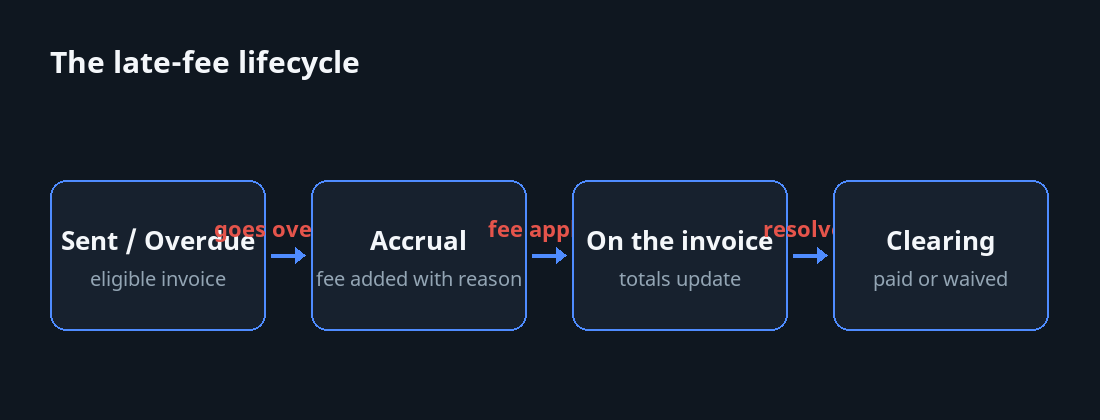
A late fee isn't a one-time stamp; it has a life. Understanding the lifecycle is what keeps your books honest and your client conversations easy.
Accrual
The fee comes into existence when an eligible invoice crosses into overdue territory. For a flat or percentage fee, that's a single event; for the per-day style, accrual continues as long as the balance is unpaid. Crucially, accrual only happens on eligible invoices — ones you've actually sent or that are overdue. A draft sitting in your app is not an obligation you've placed on anyone, so it never accrues a fee. This protects you from the embarrassing scenario of a fee appearing on something the client never received.
On the invoice
The accrued fee appears on the invoice as a distinct charge with its stored reason, and the totals update — amount due now includes the fee. Because InvoiceFlow tracks the remaining balance, partial payments and the fee coexist correctly; the app knows what's still owed.
Clearing
When the situation resolves, the fee clears. That might be because the client paid in full, or because you chose to waive it. The lifecycle has a clean end state either way, so you never carry a phantom charge that's no longer real. If you remove a fee from an invoice, it's gone from the totals; if it's paid, it's recorded.
This accrual-to-clearing arc is what separates a real late-fee system from a sticky note that says "remember to add $40." The system remembers, applies, and clears — you make the policy decisions.
The push reminder
Automation only helps if you know it happened. The late-fee subsystem includes a push reminder, so you're notified rather than having to remember to check. This closes the loop: an invoice goes overdue, the fee logic engages on eligible invoices, and you get a nudge. The point isn't to make you do more work — it's to make sure nothing slips, including the decision of whether to actually let a fee stand or waive it for a client who has a good reason.
CSV stats export: know what late payment is costing you
Late fees generate data, and that data is genuinely useful for running your business. InvoiceFlow's late-fee stats include a CSV export, so you can pull the numbers out and analyze them however you like.
What the stats tell you, once you look:
- Which clients consistently trigger late fees — your real slow-payer list, with evidence rather than impressions.
- How much late payment is actually costing or recovering across a period.
- Whether your policy is working — if the same clients keep paying late despite fees, the fee may be too small, or the relationship may need a harder conversation.
Export it quarterly. A pattern you'd never notice invoice-by-invoice becomes obvious in a spreadsheet, and it gives you the basis to adjust per-client overrides with data instead of gut feeling.
Communicating the policy: where most people go wrong
A late fee you never disclosed is a late fee you can't fairly charge. The mechanics above only work if the client knew the rule before they were late. This is a one-time setup that pays off forever.
Put it on every invoice
State your late-fee terms in the invoice footer — the same place your payment instructions live. One clear line: the fee, the trigger, the grace period if any. "Payment due within 14 days. A late fee of 5% applies to balances unpaid after the due date." Because you can build this into your template footer, it's there automatically on every invoice without you thinking about it.
Match the invoice locale
If you invoice clients in their own language, the terms should be readable to them. The per-invoice locale lets a PDF go out in the client's language regardless of your app language, so the late-fee terms land in words they actually understand — which is exactly the population most likely to dispute a fee they couldn't read.
Set a grace period
A short grace window before the fee bites is good practice — it covers honest delays (a payment in transit, a client who was traveling) and reserves the fee for genuine lateness. It also makes the eventual fee feel fair rather than petty.
When to waive
Having a late-fee system doesn't mean charging every late fee. The waive decision is part of the policy, not a failure of it.
Reasonable times to waive:
- A first offense from a good client who's been reliable for years. Charging them risks a long relationship over a small sum; waiving it, while noting the policy, buys goodwill.
- A genuine, communicated reason — the client told you in advance, there was a banking issue, a real circumstance. The fee is for ignoring you, not for life happening.
- When you triggered it yourself — you sent the invoice to the wrong address, or your terms were unclear. Eat it and fix the process.
When not to waive: repeat offenders, silent non-payers, and clients who only respond once the fee appears. For those, the fee is doing exactly its job, and waiving it teaches the wrong lesson. The CSV export will tell you, over time, which clients fall into which category.
A ten-minute setup checklist
- Pick your default mode — flat, percentage, or per-day — based on your typical invoice size and payment cycle.
- Set the amount or rate. Keep it meaningful but fair for your market.
- Set a grace period so honest delays don't trigger it.
- Create a couple of charge presets with clear stored reasons.
- Add the late-fee terms to your invoice template footer, once.
- Add per-client overrides: off for your best clients, stricter for known slow payers.
- Confirm the policy applies only to sent/overdue invoices — never drafts — so you never charge for something unseen.
- Plan to export the CSV stats quarterly and adjust.
Done once, this runs quietly in the background. The fee accrues on eligible invoices, the push reminder keeps you in the loop, the totals stay correct, and the stats tell you what's working. You spend your energy on the part that still needs a human — deciding when to hold the line and when to waive — and let the system handle the rest.