From Estimate to Invoice to Contract: The Full Document Lifecycle
By the InvoiceFlow team — published 16 June 2026 — 10 minute read
A deal is not a single document. It's a sequence of them, each marking a different moment in the relationship between you and your customer. You make an offer. They accept. You agree the terms in writing. You do the work and hand it over. You ask to be paid. Skip a step and you create a gap — a gap where misunderstandings, disputes, and unpaid balances live.
InvoiceFlow handles four document types, and they line up almost exactly with the stages of a real deal: the estimate (your offer), the contract (the agreed terms, with a signature), the delivery note (proof you handed something over), and the invoice (the demand for payment). This article walks one real deal through all four, explains what each document is for, and shows the conversions that connect them — including the partial conversion that trips up so many people.
The four documents at a glance
- Estimate (quote) — "Here's what it would cost." A pre-sale offer. Not a demand for money. The customer can accept, negotiate, or walk away.
- Contract — "Here's what we've agreed, and here's your signature on it." The terms made binding. Supports a digital signature.
- Delivery note — "Here's what was handed over." Proof of delivery or completion. Doesn't ask for money.
- Invoice — "Here's what you now owe." The demand for payment, with the amount due, the date, and how to pay.
They're not interchangeable, and the order matters. Let's follow a deal.
The deal: a kitchen fit-out in Leeds
Meet Priya, who runs a small joinery business. A homeowner, Tom, wants a fitted kitchen: cabinetry, a worktop, installation. It's a £6,400 job that will run over three weeks. Here's how the four documents carry it from first phone call to final payment.
Stage 1 — the estimate
Tom calls and describes what he wants. Priya measures up, then sends an estimate. It lists the scope as line items — carriage cabinets, oak worktop, fitting labour, waste removal — with a price against each and a clear total of £6,400. It states the tax treatment, a validity period ("valid for 30 days"), and the payment terms that will apply if Tom goes ahead.
The estimate is an offer, not a bill. Tom owes nothing by receiving it. He can accept it, ask Priya to drop the waste removal, or get a second quote. Crucially, because it's written down and itemized, there's no argument later about what was and wasn't included. The vague "yeah, about six grand" conversation is replaced by a document both parties can point to.
In InvoiceFlow, the estimate is a first-class document type — not a relabelled invoice. It gets its own numbering and its own status, so Priya can see at a glance which estimates are still open, which were accepted, and which expired without a reply.
Stage 2 — the contract and the signature
Tom says yes. For a £6,400 job spanning three weeks, a handshake isn't enough — Priya wants the terms in writing and signed. She raises a contract that captures the scope, the price, the schedule (a deposit, a payment when the cabinets land, the balance on completion), and the things that prevent disputes: what happens if Tom changes his mind mid-job, who's responsible for clearing the room, how variations are priced.
Then the part that makes it stick: InvoiceFlow contracts support a digital signature. Priya can capture Tom's signature on the spot — he signs on the screen at the kitchen table — and it's placed on the contract. No printing, no scanning, no "I'll sign it and send it back" that never happens. The signed contract is the spine of the whole deal. Every document that follows refers back to it.
This is where InvoiceFlow's separation of document types earns its keep. A contract is a different animal from an invoice: it's about agreement, not payment. Treating it as a distinct document — with its own structure and a place for a signature — is what lets it do its job.
Stage 3 — converting the estimate to an invoice (the deposit)
The contract calls for a 30% deposit before Priya orders materials. Here's the key move: she doesn't retype anything. She converts the estimate into an invoice.
Conversion carries the agreed line items straight across, so the deposit invoice matches the estimate exactly — same descriptions, same prices, same tax treatment. There's no risk of a number drifting between the quote Tom accepted and the bill he receives. The invoice is a new document with its own invoice number (the sequence tax authorities care about), but its contents come from the estimate Tom already approved.
Partial conversion: the move that trips people up
But Priya doesn't want to invoice the whole £6,400 yet — only the 30% deposit. This is where partial conversion matters. Instead of turning the entire estimate into one invoice, she converts part of it: the deposit now, the rest later.
InvoiceFlow lets you convert an estimate to an invoice in stages. The deposit invoice goes out now. The estimate isn't "used up" — there's still a balance left to invoice when the milestones are hit. This is exactly how staged billing on a real project works: a deposit up front, a payment when materials arrive, the balance on completion. Each invoice is generated from the same approved estimate, so the numbers always tie back to what the customer agreed. No spreadsheet on the side tracking "how much of the quote have I billed so far" — the app keeps the running total.
The mistake partial conversion prevents is the classic one: billing the full amount up front because retyping a partial invoice by hand is annoying, then having to issue a credit and re-bill when the customer (rightly) objects. Or the opposite — invoicing the deposit, then forgetting how much of the estimate is left and under-billing the final payment. Converting in stages from the single source estimate removes both errors.
Stage 4 — the delivery note
Three weeks in, the kitchen is fitted. Before Priya issues the final invoice, she hands Tom a delivery note: a record of what was delivered and installed — the cabinets, the worktop, the fitting work — that Tom signs to confirm he received it all and it's as agreed.
People skip delivery notes for service work, and it's a mistake. The delivery note is the document that closes the "did I actually get what I'm being billed for?" question before the invoice lands. It separates the moment of handover from the moment of billing. If, six weeks later, Tom claims a cabinet door was never fitted, the signed delivery note settles it instantly. Notice that the delivery note lists what was delivered, not the prices — prices live on the invoice. The delivery note is about receipt; the invoice is about money.
For a joiner, that signed delivery note is also a clean trigger: handover done, sign-off captured, now the final invoice can go out with confidence.
Stage 5 — the final invoice
Now Priya issues the final invoice for the remaining balance — again converted from what's left of the original estimate, referencing the contract and the signed delivery note. The invoice shows the total job value, the deposit already received, and the amount due. It carries the payment instructions: bank details, a payment link, or a QR code, as Priya prefers.
InvoiceFlow is not a payment processor — Tom pays through his own bank, the way he would pay anyone. When the money lands, Priya marks the invoice Paid. If Tom pays part of it, she records a partial payment and the app tracks the remaining balance until it clears. The deal is closed, and there's a clean paper trail from the first estimate to the final payment.
Which document, when: the decision rules
Strip away the story and you're left with simple rules.
- Use an estimate when you're making an offer and nothing is owed yet. Anything where the customer needs a price before deciding.
- Use a contract when the job is big enough, long enough, or risky enough that you want the terms agreed in writing and signed. Deposits, milestones, anything spanning weeks, anything where a dispute would be expensive.
- Use a delivery note when handover is a distinct moment from billing — goods delivered, a job completed on site, anything where "did you receive it?" could become a question.
- Use an invoice when money is genuinely owed — work done, goods delivered, or a contracted milestone reached.
For a tiny transaction — a quick repair, a small retail-style sale — you might use only an invoice. For a long, valuable project, you'll use all four. The art is matching the document weight to the deal weight: don't make a customer sign a three-page contract for a £40 job, and don't run a £20,000 project on a verbal handshake.
Why letting the documents convert (instead of retyping) matters
The single biggest source of billing errors is re-entering the same information at each stage. You quote £6,400, then type the invoice from memory and write £6,040. You agree five line items, then drop one when you re-key the bill. Every manual re-entry is a chance for the numbers to drift apart — and when the invoice doesn't match the quote, the customer notices, trust takes a hit, and you're issuing corrections.
Converting from estimate to invoice (in full or in stages) means the data flows forward from the document the customer already approved. The line items, prices, and tax treatment carry across unchanged. You're not re-typing; you're advancing the same deal to its next stage. That's the whole point of treating the four documents as one connected lifecycle rather than four unrelated files.
The lifecycle in one breath
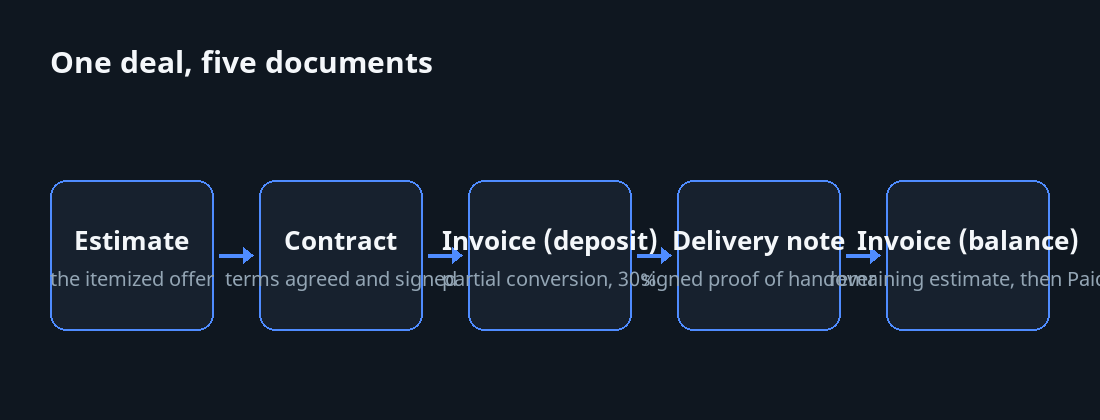
- Estimate — you make the offer, itemized and priced.
- Contract — the terms are agreed and signed (digital signature, captured on the spot).
- Invoice (deposit) — converted from the estimate, partial conversion for the deposit only.
- Delivery note — signed proof of handover, no prices.
- Invoice (balance) — converted from the remaining estimate, references the contract and delivery note.
- Marked Paid — payment recorded; partial payments tracked until the balance clears.
Four document types, one continuous thread. Each one closes a specific gap the next one would otherwise fall into. Get the sequence right and a deal that could have unravelled into "but you said," "I never got that," and "this isn't the price we agreed" instead runs from first call to final payment without a single argument worth having.