Partial Payments and Amount Due: How to Track Every Balance Without Losing the Thread
By the InvoiceFlow team — published 16 June 2026 — 11 minute read
Almost no real invoice gets paid the way the textbook says. The textbook says: issue invoice, client pays full amount, mark Paid, done. Reality says: the client pays a deposit now, the balance "next week," then half of the balance because a budget got frozen, then the rest after you chased twice. By the time it's settled you've forgotten how much was actually outstanding, and you're squinting at three bank notifications trying to reconstruct the math.
This is the single most common bookkeeping failure for freelancers and small businesses: not failing to send invoices, but losing track of which invoices are partly paid. A fully paid invoice is easy. A completely unpaid one is easy. The dangerous middle — partially paid — is where money quietly leaks out of your business. This guide is about closing that leak: how to record partial payments cleanly, always know the exact amount due, and combine partial payments with planned installments so the messy real world stays organized.
First, a clear distinction: recording vs collecting
InvoiceFlow is not a payment processor, and understanding that is the key to using it well. It does not charge a card, move money, or sit between you and your client's bank. What it does is the half that actually keeps you solvent: it records the money you receive — wherever you receive it — and tracks the balance.
The customer pays you however you've arranged: a bank transfer, cash on site, a transfer through their banking app, a payment link you display, or a QR code printed on the invoice. Your invoice can show those payment instructions — bank details, a payment link, or a QR code — so the client knows exactly where to send the money. Then, when the money lands, you tell the app what arrived. The app does the arithmetic: total minus what's been received equals amount due. Forever, on every invoice, without you keeping a parallel spreadsheet.
This split matters because it's honest about where the risk lives. The risk isn't in moving the money — banks do that fine. The risk is in remembering what's still owed across dozens of live invoices, each at a different stage. That's the job InvoiceFlow takes off your plate.
The three states every invoice lives in
In practice an invoice is always in one of three financial states, and the whole system rests on keeping them honest:
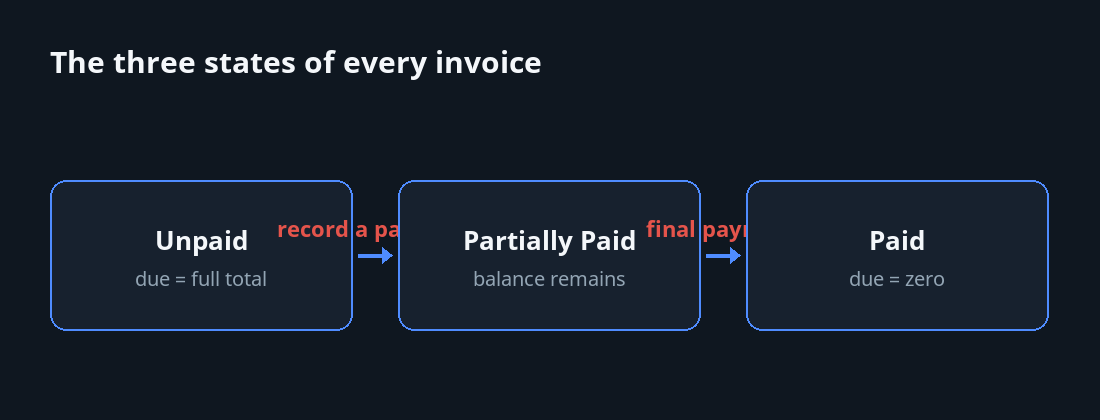
- Unpaid — nothing received yet. Amount due equals the full total.
- Partially Paid — some money has arrived; a balance remains. Amount due equals total minus what you've recorded.
- Paid — the full amount is in. Amount due is zero. You can close it with a clear conscience.
When you receive money against an invoice, you record it and mark the invoice Partially Paid (if a balance remains) or Paid (if it's fully settled). The app recalculates the amount due immediately. There is never a moment where the displayed balance disagrees with what you've actually entered — which is exactly the property a shoebox of bank screenshots can never give you.
Why "amount due" is the number that matters
Revenue on paper is a vanity number. The number that runs your business is the amount due across all open invoices — the money that's been promised, partly delivered, and not yet fully collected. When you can see, at a glance, the total still outstanding and which specific invoices make it up, three things happen: you chase the right clients, you stop double-counting deposits as if they were full payments, and you can answer "how much is the business actually owed right now?" without an evening of reconstruction.
Scenario 1: Deposit now, balance on delivery
This is the bread-and-butter case. Maya, a brand designer in Austin, quotes a logo-and-identity package at $3,200. Her terms are 50% to start, 50% on final files. She issues the invoice for the full $3,200 so the client sees the complete scope and total — that's the contract of record.
The client transfers $1,600 to start. Maya records a payment of $1,600 against the invoice and marks it Partially Paid. The app now shows: total $3,200, received $1,600, amount due $1,600. She begins work. Three weeks later she delivers, the client sends the remaining $1,600, she records the second payment, and the invoice flips to Paid with an amount due of zero.
Notice what she did not do: she did not create two separate invoices for $1,600 each. One invoice, one running balance, two recorded payments. When tax season arrives or the client asks for "the invoice for that project," there is exactly one document, and its payment history tells the whole story.
Scenario 2: The client who pays in chunks
Some clients simply don't pay in clean halves. They pay what they can, when they can. Tomas runs a small print shop and bills a corporate client $4,500 for a quarter of work. The client's accounts department releases money in irregular dribs: $1,000 one week, $1,500 ten days later, then a long silence, then $800, then the final $1,200 after Tomas sends a polite reminder.
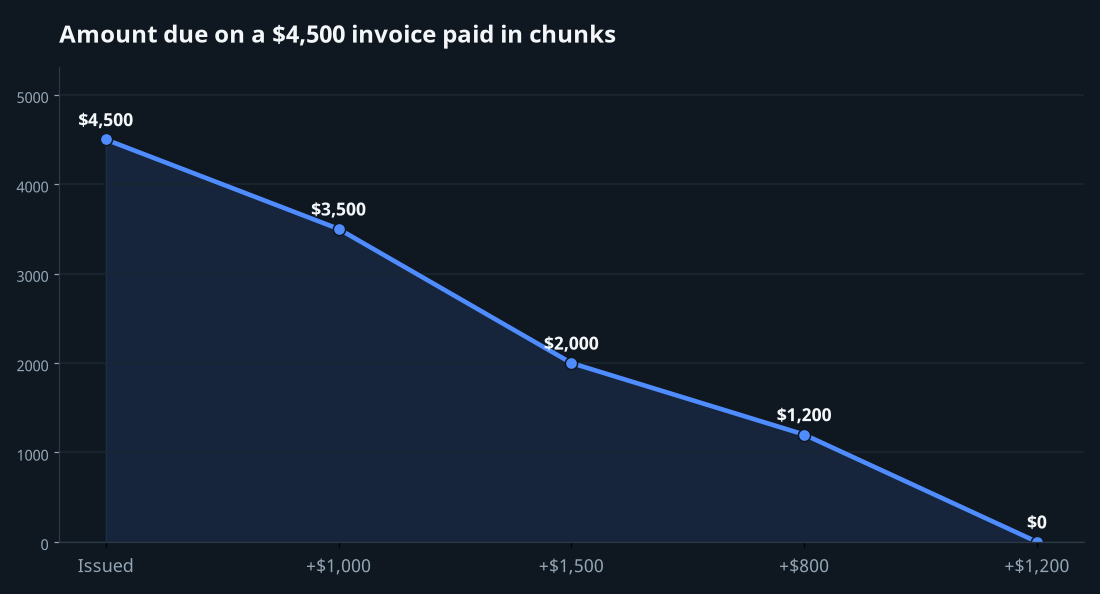
For a paper-and-memory system this is a nightmare — five payments, no round numbers, and a real chance of either undercounting (chasing money you've already got) or overcounting (closing an invoice that's still $1,200 short). In InvoiceFlow, Tomas records each amount as it lands. After payment one: amount due $3,500. After payment two: $2,000. After three: $1,200. After the last: zero, and the invoice marks Paid. At no point does he do mental arithmetic. The invoice always carries its own running total, and a glance tells him precisely what's left.
This is where partial-payment tracking earns its keep. The clients who pay in chunks are exactly the ones you're most likely to lose money on, because the irregularity itself is what defeats memory. Let the app remember.
Scenario 3: Milestone part-payments on a long project
Now combine partial payments with structure. On longer engagements you don't just want to record whatever arrives — you want to plan the part-payments in advance and show the client the schedule. That's where split payment schedules come in.
A split payment schedule breaks one invoice into a payment plan — an installment structure with defined amounts and dates. InvoiceFlow includes a dedicated installment template that renders the schedule cleanly on the PDF, so the client sees the full total and the planned breakdown on a single professional document.
Consider Priya, a web consultant building a $12,000 site over three months. She structures it 30/40/30: $3,600 to start, $4,800 at the staging-site milestone, $3,600 on launch. She issues one invoice for $12,000 with a split schedule showing the three installments and their due dates, rendered with the installment template. The client signs off on a single document that lays out exactly what's owed and when.
Then reality runs through it. The deposit arrives — she records $3,600, amount due $8,400, status Partially Paid. The staging milestone is approved and the $4,800 lands — recorded, amount due $3,600. At launch the final installment comes in — recorded, amount due zero, marked Paid. The plan (the schedule) and the reality (the recorded payments) coexist on the same invoice. You can always compare what should have been paid by now against what actually has been.
Schedule vs recorded payment — keep them straight
It's worth being precise about the two layers, because conflating them causes errors:
- The split payment schedule is the plan — "here's how we intend to break this up." It's printed on the invoice and agreed in advance.
- A recorded payment is a fact — "this much money actually arrived." It changes the amount due.
A planned installment that hasn't been paid yet is still part of the amount due. Only recording the payment moves the needle. Keep that mental model and you'll never mistake an intention for a receipt.
The everyday workflow
Stripped to its essentials, the routine is short enough to do standing at the till or between client calls:
- Issue the invoice for the full amount. Even if you expect part-payments, the invoice states the total scope. Add a split payment schedule if the part-payments are planned in advance.
- Show the client how to pay. Put your bank details, a payment link, or a QR code on the invoice so there's no friction at their end.
- When money arrives, record it. Enter the amount received. Mark the invoice Partially Paid if a balance remains, or Paid if it's settled.
- Read the amount due. The app shows total, received, and remaining balance. That remaining balance is the only number you need to chase.
- Repeat until zero. Each receipt lowers the amount due until the invoice closes as Paid.
Five steps, no spreadsheet, no mental math. The discipline is simply this: record the money the same day it arrives. A payment you don't record is a balance you'll misjudge.
Where this connects to the rest of your numbers
Partial-payment tracking isn't an island. Because every recorded payment updates the amount due, your Analytics — paid versus outstanding, collection rate, and which clients carry the biggest open balances — reflect reality rather than wishful totals. Outstanding balances feed directly into the picture of what your business is actually owed.
It also pairs naturally with late fees. When a balance lingers past its due date on a sent or overdue invoice, you can charge a late fee against the outstanding amount — and because the app already knows the precise balance, the fee is calculated on the right number, not a guess. (Late fees apply only to eligible invoices, never drafts.) The amount-due figure is the hub the other money features rotate around.
Common mistakes — and how the balance protects you
Mistake 1: Treating a deposit as a closed sale
A deposit feels like a win, and psychologically people file it as "paid." But a 50% deposit means you're owed exactly as much as you've received. Marking the invoice Partially Paid — not Paid — keeps the remaining balance visible so it never slips into the "done" pile prematurely.
Mistake 2: One invoice per payment
Splitting a single job into a new invoice for each installment fragments the record. You lose the single source of truth for "what does this project total, and what's left?" Keep one invoice and record multiple payments against it. The payment history lives in one place.
Mistake 3: Recording from memory at month-end
If you batch up a month of receipts on the 30th, you'll inevitably misremember a partial against a similar-looking client. Record on the day. The whole point of a running amount due is that it's always current; let it go stale and it's just a slower spreadsheet.
The wider point
Getting paid is rarely a single clean event. It's a sequence — a deposit, a milestone, a chunk, a chase, a final settlement — and the businesses that stay healthy are the ones that can see that sequence clearly at any moment. You don't need a payment processor to do that. You need an honest running total of what's been received and what's still due, on every invoice, updated the day money moves.
That's the quiet superpower of partial-payment tracking. Not flashy, not automated magic — just an amount-due number you can trust, so the messy middle where money leaks out of small businesses finally has somewhere to be counted.