The Dubai Property Manager Who Stopped Retyping Rent Invoices
By the InvoiceFlow team — published 16 June 2026 — 10 minute read
Mariam Haddad manages forty-three units. They are scattered across four buildings — two towers in Business Bay, a low-rise block in Al Barsha, and a cluster of villas out in Arabian Ranches — and they belong to eleven different owners. Some owners hold a single apartment as an investment; one holds nineteen units across two of the towers and treats Mariam less like a manager and more like a small finance department. On the first of every month, every one of those forty-three units generates an invoice: rent for the tenant, service charges where they apply, the odd one-off for a repair or a replaced air-conditioning filter. Forty-three invoices, every month, almost identical to last month, almost identical to next month.
For two years Mariam built every one of them by hand. The first of the month was a write-off — a full day, sometimes a day and a half, of opening last month's documents, changing the date, changing the invoice number, double-checking the amount, exporting the PDF, and emailing it out. By unit thirty her eyes were glazed and the mistakes crept in: a number reused, a tenant who'd moved out still invoiced, an owner's villa billed in the wrong currency. Each mistake meant an apologetic email and a correction, and corrections in property management erode trust faster than almost anything, because the one thing an owner wants from you is that the money side is boringly, reliably correct.
The problem isn't the invoices — it's that they repeat
Here is the thing about rent. It is the most predictable invoice in the world. The same tenant, in the same unit, owes the same amount, on the same day, month after month, until something changes. There is almost no creative work in a rent invoice. And yet a property manager with dozens of units can lose a full working day a month to producing them, simply because doing the same small task forty-three times by hand is slow and error-prone, no matter how simple each instance is.
That's the trap. The work isn't hard; it's repetitive. And repetitive work done by hand is exactly the kind of work that should be set up once and then left to run. The skill in managing a large portfolio is not in typing the invoices — it's in keeping the units, tenants, owners and currencies straight, and in being able to show each owner, on demand, exactly where their money stands. The typing should disappear.
So Mariam rebuilt her whole month around three ideas: let the recurring invoices generate themselves, organize the portfolio so she can find any slice of it instantly, and be able to hand any owner a clean report without assembling it from scratch. She runs the entire operation from her phone and a tablet, with InvoiceFlow as the engine.
Step one: recurring schedules do the monthly run
The single biggest change was setting up a recurring schedule for each tenancy. A recurring schedule auto-generates the invoice on a cadence — monthly, in her case — so the document she used to rebuild forty-three times by hand now appears on its own. She set each one up once: the tenant, the unit, the rent amount, the service charge line if the unit carries one, the due date, the currency. From then on, on the first of the month, the invoices generate themselves.
Crucially, the invoice numbering stays correctly sequential across the whole run. This sounds like a small detail until you've lived without it. When you're producing dozens of documents by hand, duplicate or skipped invoice numbers are almost inevitable, and they are precisely the kind of thing that turns an owner's annual review — or, worse, an auditor's — into an afternoon of awkward questions. Letting the schedule own the numbering took that entire class of error off the table.
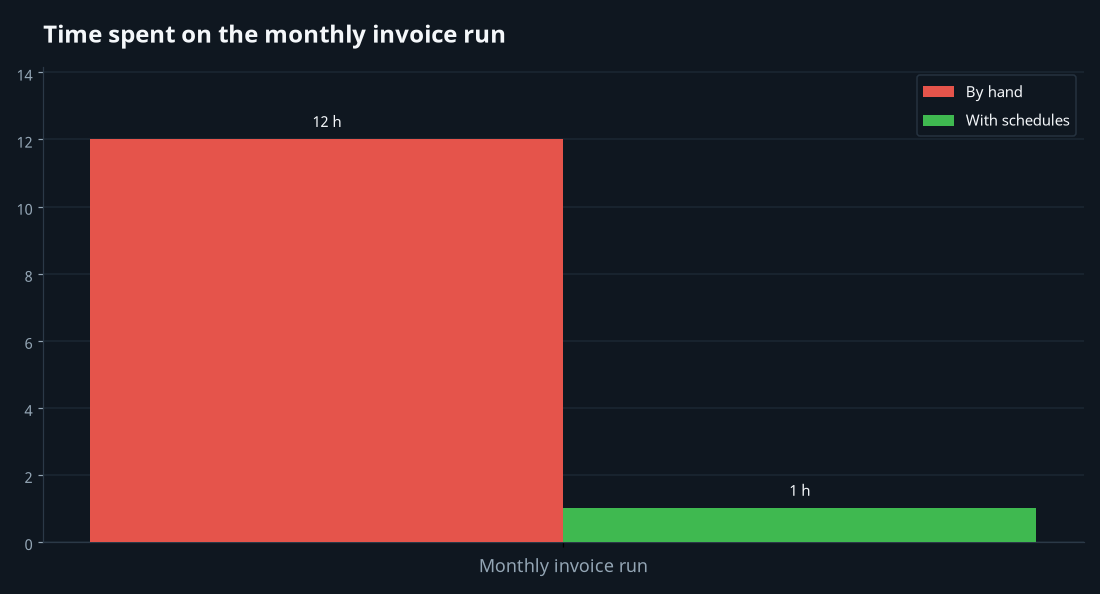
The recurring engine doesn't just save the typing. It changes what the first of the month feels like. Instead of a dreaded full-day chore, it's a review: Mariam opens the app, sees the month's invoices already generated, scans them for anything that needs a human eye, and sends. A day-and-a-half job became something closer to an hour, and most of that hour is checking, not creating.
When something changes, you change the schedule — not the next thirty invoices
Tenancies aren't frozen. A lease renews at a higher rent; a tenant moves out and a new one moves in; a service charge gets revised. With everything running off schedules, a change is a single edit in one place. New rent from July? Mariam updates that one schedule and every future invoice reflects it. Tenant gone? She stops the schedule for that unit. She is editing the source of the invoices, not chasing down and correcting a stack of documents after the fact. The portfolio stays accurate because the rules that produce it stay accurate.
Step two: client groups and categories to keep the portfolio straight
Forty-three tenants is too many to hold in your head, and the relationships matter: this tenant is in that building, which belongs to this owner. Mariam uses client groups and categories to model exactly that structure. She organizes clients by building — Business Bay Tower A, Business Bay Tower B, Al Barsha block, Arabian Ranches villas — and, because the feature supports parent categories with sub-categories, she nests them: a parent group per owner, with sub-categories per building beneath it. So she can look at "everything belonging to the owner with nineteen units," or drill into "just Tower B," in a couple of taps.
On top of that she uses advanced filters — filtering the client list by relationships and by attributes — to pull up precise slices on demand: every villa tenant, every unit owned by a particular investor, every tenancy in a single building. There's a dedicated client-groups management screen where she maintains the whole structure. When the owner of those nineteen units calls and asks "how are my Tower A units doing this month," Mariam isn't scrolling through forty-three names hunting for the right ones. She filters to that owner's Tower A group and has the answer in front of her.
This organizational layer is the quiet hero of managing a big portfolio. Generating invoices fast is worthless if you can't then answer "which of these belongs to whom" instantly. The groups and categories turn a flat list of tenants into the actual shape of the business — buildings, owners, the lot — so every other task gets faster.
Step three: each invoice in its own currency
Dubai is an international city and Mariam's owners are not all in dirhams. Most tenancies invoice in AED, naturally. But one owner, based abroad, prefers his statements and certain charges handled in euros, and an occasional corporate let is billed in US dollars. InvoiceFlow lets each invoice be issued in its own currency, with correct formatting for that currency — so an AED rent invoice, a euro owner charge and a dollar corporate invoice all look right, each in its own denomination.
A point of honesty, because it matters: the app is not doing live currency conversion. It isn't fetching exchange rates and converting AED into euros for you. What it does is let you issue each document in the currency it should be in, formatted properly. For Mariam that's exactly right — a euro charge is a euro charge; she doesn't want it silently re-rated. She sets the currency on the schedule for that owner's units once, and every generated invoice comes out correctly denominated without her thinking about it again.
Step four: showing payment details and tracking who's actually paid
Worth being clear about what InvoiceFlow is and isn't here. It is not a payment processor — it doesn't collect the rent. What it does is produce the invoice with the payment instructions on it — the bank details a tenant needs to make the transfer — and then let Mariam record what comes in. When a tenant pays, she marks the invoice Paid. When a tenant pays part of the rent — it happens, especially around a tight month — she records a partial payment and the app tracks the remaining balance, so the amount still due is exact rather than something she's reconstructing from her memory of a half-conversation.
That paid/partially-paid/outstanding status across forty-three units is the real-time pulse of the portfolio. At a glance Mariam can see who has paid, who hasn't, and exactly how much is outstanding where. For a job whose whole reputation rests on the money side being correct, that single source of truth is worth more than any other feature.
Step five: reports that owners actually want to see
The other half of property management is reporting up. Owners want to know, regularly and clearly, what their property earned and what's outstanding. Mariam used to dread the monthly and quarterly owner updates almost as much as the invoice run, because assembling them meant trawling back through documents and totting up figures by hand.
Now she leans on analytics and reports: revenue, paid versus outstanding, collection rate, top clients, trends over time. Combined with the group structure, she can frame the numbers around what an owner cares about — their units, their buildings — rather than the portfolio as an undifferentiated lump. The owner with nineteen units gets a picture of his nineteen units. The investor with a single apartment gets the story of that apartment. She's not building reports from nothing; she's reading them off the data that the invoicing already produced.
There's a built-in insights assistant she uses for quick checks, too. It answers preset commands against her own data — a revenue summary, which invoices are overdue, her top clients, monthly stats. It's important to understand what it is: it surfaces her numbers in response to those commands. It is not a chatbot that writes owner emails for her or invents analysis. It's a fast way to ask her own ledger a direct question and get the figure back, which is exactly what she wants when an owner is on the phone asking how the month went.
What the month looks like now
The first of the month used to cost Mariam a day and a half and a low hum of anxiety about which mistake she'd find later. Now the recurring schedules generate the forty-three invoices overnight; she spends the morning reviewing them, catching the handful that genuinely changed — a renewal here, a move-out there — and sending the rest. Numbering is automatically sequential, so there's no duplicate to untangle at year-end. Each invoice is in the right currency because the schedule already knows. Throughout the month she marks payments as they land and records the occasional partial, so the outstanding figure is always live. And when an owner calls, she filters to their group and reads them their numbers, or pulls a report, without assembling anything.
None of this made her portfolio bigger on its own — but it gave her the capacity to take on more. The administrative ceiling on a property manager isn't usually their ability to manage units; it's the hours swallowed by the repetitive paperwork those units generate. Remove the repetition, keep the organization tight, and the same person can hold a great deal more.
The pattern, for anyone managing many recurring bills
Mariam manages property, but the system fits anyone issuing many near-identical invoices on a cadence — letting agents, co-working operators, equipment-hire firms, anyone running retainers or subscriptions across a roster of clients:
- Put every recurring bill on a schedule so the invoices generate themselves with correct sequential numbering — review and send instead of building from scratch.
- Edit the schedule, not the output — when a price or tenancy changes, change it once at the source and every future invoice follows.
- Model the real structure with groups and categories (parent owners, sub-categories per building) and use filters so you can pull any slice instantly.
- Issue each invoice in its own currency where clients differ — formatted correctly, with no assumption of live conversion.
- Record payments and partials as they arrive so the outstanding balance is always exact and the paid/unpaid picture is real-time.
- Read your reports, don't build them — let analytics frame each owner's numbers so the monthly update is a five-minute job, not a dreaded one.
Mariam puts it simply: "I used to spend the start of every month proving I could type. Now I spend it managing. The invoices show up on their own — my job is to make sure the right ones, in the right currency, go to the right people, and that I can tell every owner exactly where they stand." Same forty-three units. A day and a half a month handed back.